Free Shipping on Domestic Orders $75+

Oregon Scientific Meep! 4.0 Battery Replacement

What you need

    1. Oregon Scientific Meep! 4.0 Battery Replacement, Oregon Scientific Meep! 4.0 Disassembly: step 1, image 1 of 1
      • Use a screwdriver to remove the four 7.0 mm Philips #00 screws from the back of the device.

      Ask FixBot

      Add Comment

    2. Oregon Scientific Meep! 4.0 Battery Replacement: step 2, image 1 of 1
      • Use a plastic opening tool to detach the clips on the inside of the device.

      Ask FixBot

      Add Comment

    1. Oregon Scientific Meep! 4.0 Battery Replacement, Battery: step 3, image 1 of 1
      • Remove the black tape holding the battery in place.

      Ask FixBot

      Add Comment

    2. Oregon Scientific Meep! 4.0 Battery Replacement: step 4, image 1 of 1
      • Use a spudger to separate the battery from its adhesive.

      Ask FixBot

      Add Comment

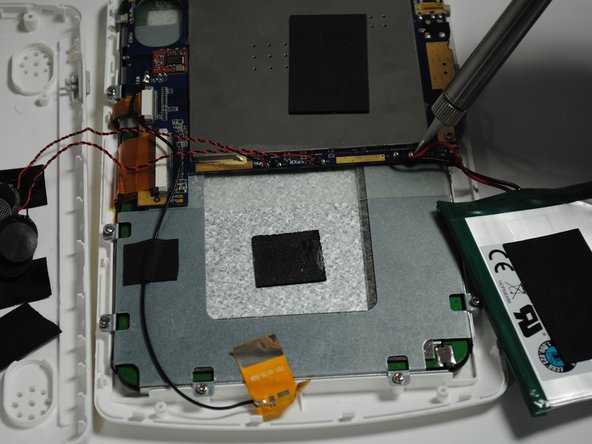
    3. Oregon Scientific Meep! 4.0 Battery Replacement: step 5, image 1 of 2 Oregon Scientific Meep! 4.0 Battery Replacement: step 5, image 2 of 2
      • Use a soldering station to separate the battery from its connecting wires.

      Ask FixBot

      Add Comment

Conclusion

To reassemble your device, follow these instructions in reverse order.

Cancel: I did not complete this guide.

Jess Forte

Member since: 09/25/15

434 Reputation

4 Guides authored

0 Guide Comments

Add Comment

View Statistics:

Past 24 Hours: 2

Past 7 Days: 20

Past 30 Days: 53

All Time: 803