
Oregon Scientific BAR339DP Light Projector Repurpose

bmdbest and 2 other contributors
Last updated on Aug 1, 2024
Views: 823
View statistics:
- Past 24 Hours:
- 1
- Past 7 Days:
- 14
- Past 30 Days:
- 81
- All Time:
- 823
Comments: 1
1 comment on steps.
Completed: 0 1
No one has marked this guide "completed." Will you be the first?
1 person has marked this guide "completed." It's you — great job!
Favorites: 1 2
1 person has favorited (and subscribed to) this guide. Will you be next?
2 people have favorited (and subscribed to) this guide — including you!
Community-Contributed Guide
An awesome member of our community made this guide. It was not created by iFixit staff.
Introduction
Go to step 1 ↓The Oregon Scientific is a great clock with projection and weather station. Unfortunately, the projection digits failed over time and started fading away.
I tried to fix the segments and reposition the connecting strip connecting the LCD used for projection, the fix FAILED but I ended up with a new functionality - a weather station that projects Mars planet on my ceiling.
What you need
Tools


-
-
-
Instead of showing the clock/weather in the projection, you'll end up to see a large red disc.
-
This is going to REPLACE the existing functionality and is most likely not undoable.
-
Proceed at your own risk!
 Ask FixBot
-
-
-
Gently pry open the front case of the projector module.
-
Undo the 6 screws using a small Phillips screwdriver and remove the cover.
-
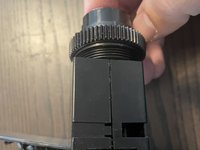
Pull on the projection assembly to detach it from the case. The top part, containing the lens is detachable by hand, the bottom one has 3 clips and a nut that secures it.
-
-
-
Using a flat screwdriver/pryer press on the tabs on both sides of the assembly to make them loose.
-
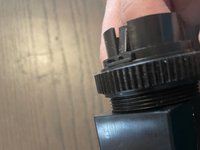
Gently press on the upper piece of plastic, to the top.
-
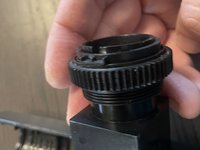
Unscrew the large nut.
-
-
-
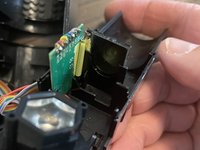
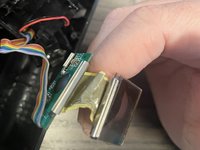
After you disassemble the projector case, you can see the projector light, the passthrough display and the board that powers it.
-
You have 2 options:
-
Try to remove the connecting flex cable between the display and the board and replace it/repair it or clean the contacts on both ends. [I have tried this without success as the wires ripped off because they were aged]
-
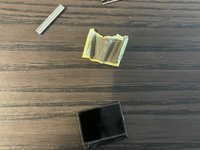
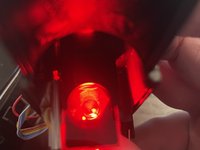
Remove the display from the position (with or without removing the flex cable) and allow the projecting light to go through the lens directly - this way you obtain a big round red light: Mars on your wall!
-
-
-
-
The red light is very bright, now it's time to reassemble the device in the reverse order!
-
In case you decided to remove the LCD screen, you should end up with a projection as seen in the picture taken in a dark room.
-
Enjoy your new ceiling light!
-
-







To reassemble your device, follow these instructions in reverse order.

