
Optoma HD20 Color Wheel Replacement

Trever and 6 other contributors
Last updated on Jan 9, 2020
Views: 10K
View statistics:
- Past 24 Hours:
- 1
- Past 7 Days:
- 28
- Past 30 Days:
- 139
- All Time:
- 10,158
Comments: 12
9 comments on steps, 3 guide comments.
Go to guide commentsCompleted: 6 7
6 people have marked this guide "completed." Will you be next?
7 people have marked this guide "completed." Including you — great job!
Favorites: 0 1
No one has favorited (and subscribed to) this guide. Will you be the first?
1 person has favorited (and subscribed to) this guide — and that's you!
Needs More Images
A few more images would make this guide's procedures crystal clear.
Better Introduction
Improve this guide by completing or revising its introduction.
Introduction
Go to step 1 ↓Use this guide to remove the color wheel from your Optoma HD20.
What you need
Tools


-
-
-
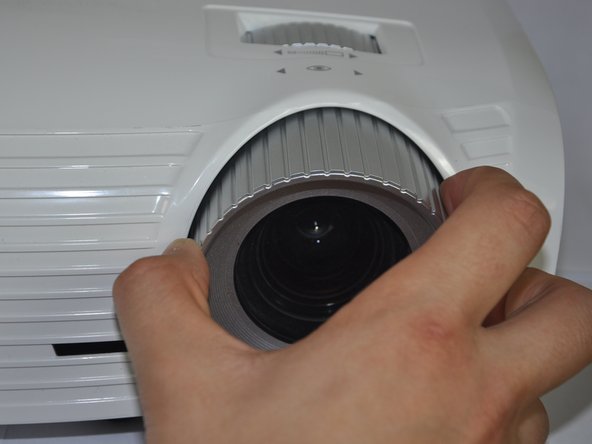
Twist the focal cap clockwise until it is fully extended.
-
Remove the focal cap by pulling it straight out.
 Ask FixBot
-
-
-
Use a Phillips #1 screwdriver to remove the three 7.5mm screws on the bottom of the device.
-
-
-
Remove the ribbon by disconnecting it from the main circuit board.
-
Lift up the clip holding it down and pull the ribbon out.
-
-
-
-
-
Use a Phillips #1 screwdriver to remove the 5.5 mm screws around the pin wheel.
-
-
-
-
Using a flat head screw driver unscrew the back part to release the color wheel.
-


To reassemble your device, follow these instructions in reverse order.
Cancel: I did not complete this guide.
6 other people completed this guide.

Team

Cal Poly, Team 21-23, Maness Winter 2015 Member of Cal Poly, Team 21-23, Maness Winter 2015
CPSU-MANESS-W15S21G23
4 Members
72 Guides authored
3 Guide Comments
I've seen 5 guides say that the lens adjustment cover just pulls straight out, but even with significant force, it doesn't budge. Are there two different versions of the HD20 with two different designs for the cover?
