
Opening the case

huedrant and one other contributor
Last updated on Aug 11, 2025
Views: 573
View statistics:
- Past 24 Hours:
- 5
- Past 7 Days:
- 18
- Past 30 Days:
- 96
- All Time:
- 573
Comments: 0
No one has left comments on this guide. Will you be first?
Go to guide commentsCompleted: 0 1
No one has marked this guide "completed." Will you be the first?
1 person has marked this guide "completed." It's you — great job!
Favorites: 0 1
No one has favorited (and subscribed to) this guide. Will you be the first?
1 person has favorited (and subscribed to) this guide — and that's you!
Community-Contributed Guide
An awesome member of our community made this guide. It was not created by iFixit staff.
Introduction
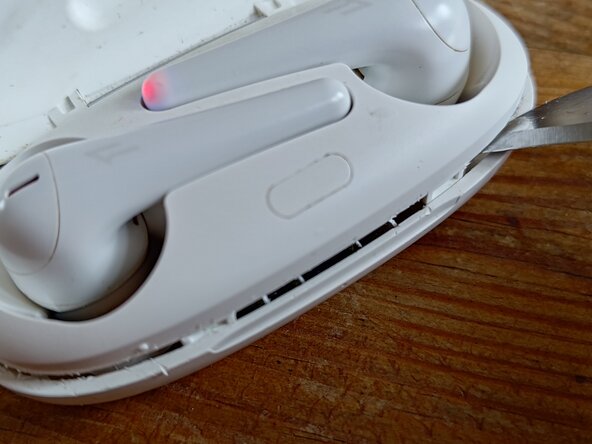
Go to step 1 ↓One of my recharger pins inside the case got stuck. I found no instructions on how to open the case, so I took a risk and opened it with a fine small knife.
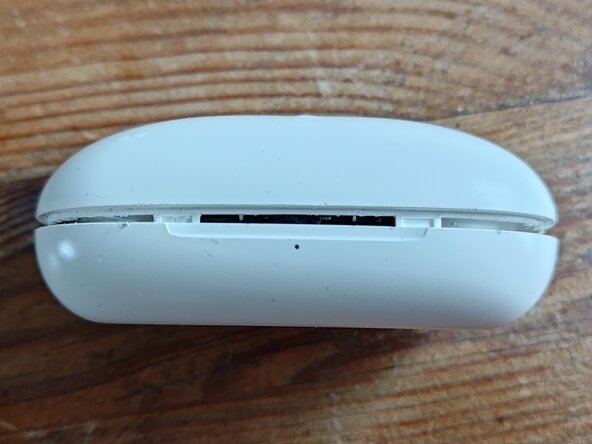
There are two hinges in the front where the case needs to be pushed out with the knife. There is no cable connection between the upper and the lower part of the case, so you don't have to take extra care for opening it.
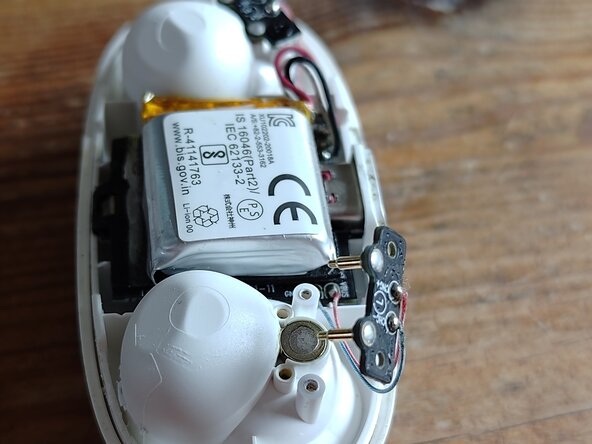
I unscrewed the pin holder once it opened.
-
-
-
Mit dem Messer vorsichtig entlang der Naht schneiden. Dann beginnen, das Gehäuse mit dem Messer auseinander zu hebeln
 Ask FixBot
-
-
-
-
Schrauben lösen und Pin Halterung entnehmen. Die Pins konnte ich so mit Alkohol reinigen und mit einer kleinen Zange in Bewegung bringen.
-
-
Arbeite die Schritte in umgekehrter Reihenfolge ab, um dein Gerät wieder zusammenzubauen.

