
Opening the Case

Travis Buck and 10 other contributors
Last updated on Oct 26, 2016
Views: 1.4K
View statistics:
- Past 24 Hours:
- 2
- Past 7 Days:
- 19
- Past 30 Days:
- 92
- All Time:
- 1,439
Comments: 0
No one has left comments on this guide. Will you be first?
Go to guide commentsCompleted: 1 2
1 person has marked this guide "completed." Will you be next?
2 people have marked this guide "completed." Including you — great job!
Favorites: 0 1
No one has favorited (and subscribed to) this guide. Will you be the first?
1 person has favorited (and subscribed to) this guide — and that's you!
Needs Better Images
Better photos will improve this guide. Help out by taking, editing, or uploading new ones!
Better Introduction
Improve this guide by completing or revising its introduction.
What you need
Tools


-
-
-
Tool on left - PH000 screwdriver
-
Tool on right - iPod fix-it tool
-
Soldering Iron
 Ask FixBot
-
-
-
Locate the 3 black screws on the bottom of the camera and the 2 gray screws on each side of the camera. Remove them with a PH000 screwdriver.
-
-
-
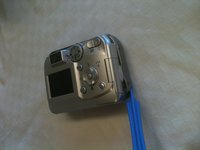
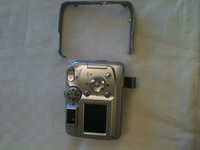
Locate the gray band that you removed the screws from; this holds the two halves of the camera together. Use an iPod fix-it tool to pry the gray band loose and remove it.
-
-
-



To reassemble your device, follow these instructions in reverse order.
Cancel: I did not complete this guide.
One other person completed this guide.

Team

Ohio State, Team 1-2, Buehl Fall 2012 Member of Ohio State, Team 1-2, Buehl Fall 2012
OSU-BUEHL-F12S1G2
3 Members
36 Guides authored
