What you need
-
-
-
Insert a SIM card eject tool into the hole on the side of the phone, just below the SIM tray.
-
Press firmly to release the tray, then pull it out the rest of the way.
 Ask FixBot
-
-
-
-
-
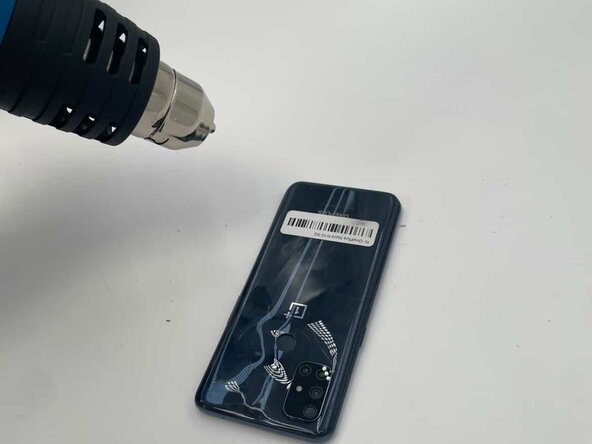
Use a heat gun to loosen the glue on the back cover.
-
Be sure to also heat the glue around the fingerprint button (this can be done at the end of this step to make it easier).
-
-
-
-
Place the suction cup onto the back and squeeze. Gently pull on the suction cup. Meanwhile, insert a prying tool between the back cover and the side to scrape the glue. Slowly remove the back.
-
-
-
Grab the screwdriver. Point the tip of the screwdriver, shaped like a plus sign, at the plus sign on the top of a screw. Insert the screwdriver into the slot and rotate counterclockwise until the screw is loose. Repeat this to unscrew the four screws around the camara lens. Then, carefully remove the lens.
-
-




To reassemble your device, follow these instructions in reverse order. Apply new adhesive where necessary after cleaning the relevant areas with isopropyl alcohol (>90%). Take your e-waste to an R2 or e-Stewards certified recycler.

Team

University of North Texas, Team 5-4, Kilpatrick Fall 2025 Member of University of North Texas, Team 5-4, Kilpatrick Fall 2025
UNT-KILPATRICK-F25S5G4
4 Members
60 Guides authored
