Free Shipping on Domestic Orders $75+

OnePlus 8 Pro Battery Replacement

What you need

    1. OnePlus 8 Pro Battery Replacement, Battery: step 1, image 1 of 1
      • Heat up the back edge of the phone with the iOpener / any HotPack.

      • Start with a long edge as it is easier to open the back cover in the next step.

      • You may also use a hair dryer or heat gun to heat the adhesive.

      • Be careful not to overheat the phone - the screen and internal battery are susceptible to heat damage.

      Ask FixBot

      Add Comment

    2. OnePlus 8 Pro Battery Replacement: step 2, image 1 of 1
      • Insert the opening pick in the middle of the phone where you heated it. Slide it along the edge to cut through the adhesive.

      • This can be a bit tricky, don't use any sharp objects as you can damage the case. It's reccomended that you use a plastic wedge tool such as the one by iFixit, as it has a thicker ledge to prevent you from slicing too far in.

      • If it does not work, try heating the edge again.

      • Don't insert the opening pick too far. There are no flex cables in the way, but the wireless charging coil could be damaged.

      Ask FixBot

      Add Comment

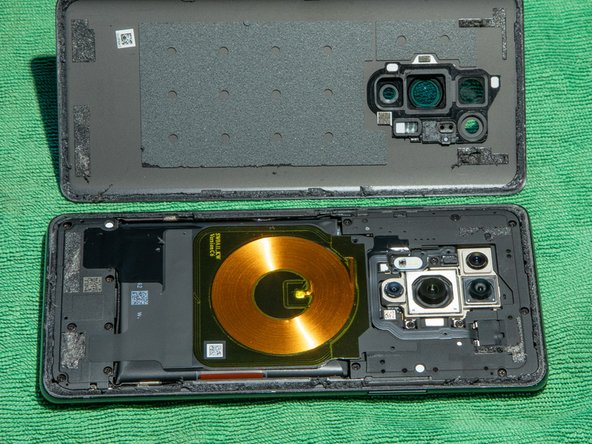
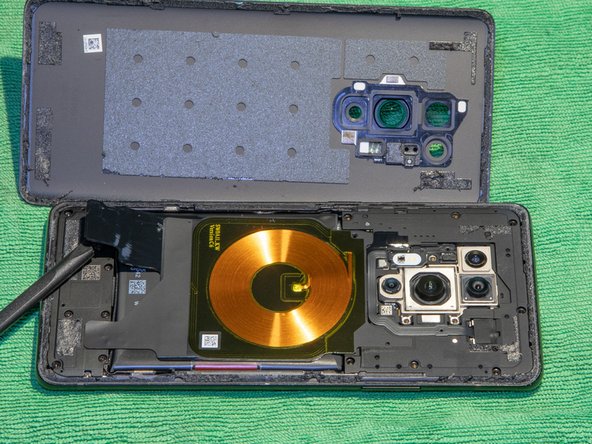
    3. OnePlus 8 Pro Battery Replacement: step 3, image 1 of 2 OnePlus 8 Pro Battery Replacement: step 3, image 2 of 2
      • Leave the opening picks once you managed to open one side.

      • Use heat on the next edge to open it.

      • Repeat steps 2 and 3 for all four edges.

      Ask FixBot

      Add Comment

    4. OnePlus 8 Pro Battery Replacement: step 4, image 1 of 1
      • Remove these screws (Phillips 00).

      • Remove this Phillips 00 screw. You can remove the white paper with tweezers or just push the screwdriver through the paper.

      Ask FixBot

      Add Comment

    5. OnePlus 8 Pro Battery Replacement: step 5, image 1 of 2 OnePlus 8 Pro Battery Replacement: step 5, image 2 of 2
      • Carefully lift the two stickers which hold the wireless charging coil down.

      Ask FixBot

      Add Comment

    6. OnePlus 8 Pro Battery Replacement: step 6, image 1 of 1
      • Lift the charging coil.

      • Remove the two Phillips 00 screws below the coil.

      Ask FixBot

      Add Comment

    7. OnePlus 8 Pro Battery Replacement: step 7, image 1 of 1
      • Remove the top cover / coil assembly.

      Ask FixBot

      Add Comment

    8. OnePlus 8 Pro Battery Replacement: step 8, image 1 of 1
      • Disconnect the battery.

      Ask FixBot

      Add Comment

    9. OnePlus 8 Pro Battery Replacement: step 9, image 1 of 1
      • Pull the red pulling tab away from the battery.

      • Separate the red pulling tab from the black adhesive.

      • After separating, hold the black adhesive down and pull the red tab up vertically to remove the battery.

      • Make sure not to bend the battery too heavily.

      Ask FixBot

      Add Comment

    10. OnePlus 8 Pro Battery Replacement: step 10, image 1 of 2 OnePlus 8 Pro Battery Replacement: step 10, image 2 of 2
      • Remove the red pulling tab from the old battery and stick it on the under side of the new battery.

      • This makes it easier to replace the battery again.

      • Insert the new battery.

      • Wrap the black adhesive strips on both sides around the battery to secure it.

      Ask FixBot

      Add Comment

    11. OnePlus 8 Pro Battery Replacement: step 11, image 1 of 1
      • Remove the old adhesive and replace it with new adhesive strips.

      • Reverse from step 8 to assemble the phone.

      Ask FixBot

      Add Comment

Conclusion

To reassemble your device, follow these instructions in reverse order.

Cancel: I did not complete this guide.

One other person completed this guide.

Manuel Graf

Member since: 01/21/20

220 Reputation

1 Guide authored

1 Guide Comment

be carefull: the adhesives of the back cover are not only on the edge, but also on the 4 corners (see the back cover on photo of step 4). You should carefully cut these off from the short edges, BEFORE trying to lift the cover.

LeFils - Reply Share

Add Comment

View Statistics:

Past 24 Hours: 11

Past 7 Days: 49

Past 30 Days: 197

All Time: 3,153