Introduction
Use this guide to replace a broken rear glass on your OnePlus 7T.
You’ll need replacement adhesive to reattach components when reassembling the device.
What you need
-
-
-
Apply a heated iOpener to the rear glass for two minutes to loosen the adhesive beneath.
 Ask FixBot
-
-
-
Apply a suction handle to the right edge of the rear glass.
-
Pull on the suction handle to create a gap between the rear glass and the frame.
-
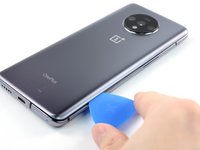
Insert an opening pick into the gap.
-
-
-
Slide the opening pick along the edge to the bottom right corner.
-
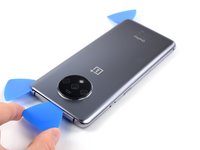
Leave the opening pick in the bottom right corner to prevent the adhesive from resealing.
-
-
-
-
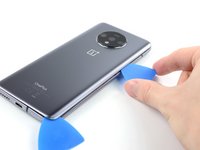
Insert a second opening pick in the gap you just created.
-
Slide the opening pick along the edge to the top right corner.
-
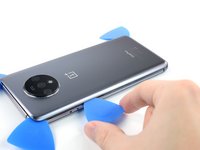
Leave the opening pick in the top right corner to prevent the adhesive from resealing.
-
-
-
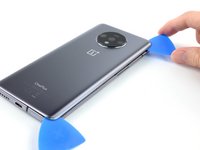
Insert a third opening pick under the top right corner of the rear glass.
-
Slide the opening pick along the edge of the phone to the top left corner to cut the adhesive.
-
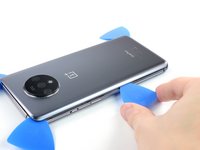
Leave the opening pick in the top left corner to prevent the adhesive from resealing.
-
-
-
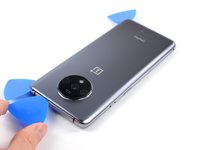
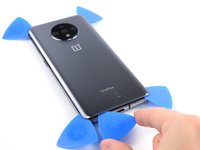
Insert a fourth opening pick under the top left corner.
-
Slide the opening pick along the edge to the bottom left corner to cut the adhesive.
-
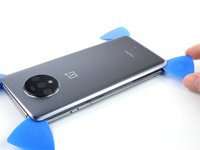
Leave the opening pick in the bottom left corner to prevent the adhesive from resealing.
-
-
-
Insert a fifth opening pick under the bottom left corner.
-
Slide it along the the edge to the bottom right corner to cut the remaining adhesive.
-
-
















To reassemble your device, follow these instructions in reverse order.
Repair didn’t go as planned? Try some basic troubleshooting, or ask our Answers Community for help.
Cancel: I did not complete this guide.
5 other people completed this guide.

