Free Shipping on Domestic Orders $75+

OnePlus 6T Speaker Replacement

What you need

    1. OnePlus 6T Speaker Replacement, Back Cover: step 1, image 1 of 1
      • Make sure the phone is powered off and placed with the back cover facing towards you on a stable surface.

      Ask FixBot

      Add Comment

    2. OnePlus 6T Speaker Replacement: step 2, image 1 of 1
      • Pop open the SIM card tray by inserting a SIM card removal tool into a small hole on the upper-left side of the phone.

      • Carefully remove the SIM card from its tray.

      Ask FixBot

      Add Comment

    3. OnePlus 6T Speaker Replacement: step 3, image 1 of 1
      • Loosen the binding glue within the phone using a hairdryer or an iOpener.

      • If you choose to use a hairdryer, hold the dryer at least eight inches from the phone and apply heat for two minutes in a circular motion around the edges of the phone.

      Ask FixBot

      Add Comment

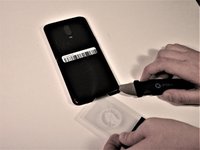
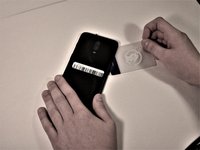
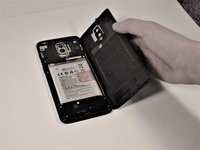
    4. OnePlus 6T Speaker Replacement: step 4, image 1 of 3 OnePlus 6T Speaker Replacement: step 4, image 2 of 3 OnePlus 6T Speaker Replacement: step 4, image 3 of 3
      Tool used on this step:
      Plastic Cards
      $2.99
      Buy
      • Insert a Jimmy under one of the heated corners of the phone to lift it slightly.

      • Insert a plastic card underneath the slightly lifted lip on the back cover and gently glide the card under the lifted phone casing.

      • There will be a small amount of tension, but this is normal as the card is removing the adhesive within the phone.

      • Remove the back cover from the phone.

      • Use high concentration (>90%) isopropyl alcohol and a lint-free cloth to remove all adhesive residue from the back cover and the frame.

      Ask FixBot

      Add Comment

    1. OnePlus 6T Speaker Replacement, Speaker: step 5, image 1 of 1
      • Remove seven 3mm Phillips #00 screws from the speaker.

      Ask FixBot

      Add Comment

    2. OnePlus 6T Speaker Replacement: step 6, image 1 of 1
      • Use a spudger to lift and remove the speaker.

      Ask FixBot

      Add Comment

Conclusion

To reassemble your device, follow these instructions in reverse order.

Cancel: I did not complete this guide.

7 other people completed this guide.

0 Guide Comments

Add Comment

View Statistics:

Past 24 Hours: 3

Past 7 Days: 9

Past 30 Days: 46

All Time: 4,338