Free Shipping on Domestic Orders $75+

OnePlus 5 Interconnect Cable Disconnect

What you need

    1. OnePlus 5 Interconnect Cable Disconnect, OnePlus 5 Interconnect Cable Disconnect: step 1, image 1 of 3 OnePlus 5 Interconnect Cable Disconnect, OnePlus 5 Interconnect Cable Disconnect: step 1, image 2 of 3 OnePlus 5 Interconnect Cable Disconnect, OnePlus 5 Interconnect Cable Disconnect: step 1, image 3 of 3
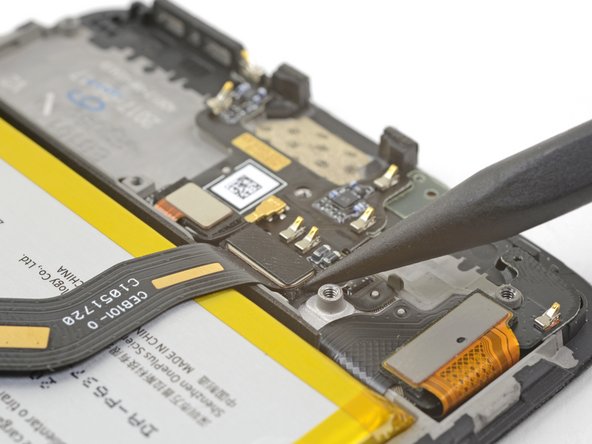
      • Use the point of a spudger to pry up and disconnect the interconnect flex cable from the socket.

      • If you are replacing the battery, bend the interconnect flex cable away from the phone and secure it out of the way with a rubber band or tape.

      Ask FixBot

      Add Comment

Conclusion

To reassemble your device, follow these instructions in reverse order.

Cancel: I did not complete this guide.

One other person completed this guide.

Arthur Shi

Member since: 01/03/18

346,745 Reputation

923 Guides authored

Team

iFixit Member of iFixit

Staff

123 Members

85,442 Guides authored

0 Guide Comments

Add Comment

View Statistics:

Past 24 Hours: 1

Past 7 Days: 5

Past 30 Days: 48

All Time: 946