Free Shipping on Domestic Orders $75+

One Education Infinity One Touchpad Replacement

Views: 635

View statistics:

Past 24 Hours:
2
Past 7 Days:
18
Past 30 Days:
85
All Time:
635
Comments: 0

No one has left comments on this guide. Will you be first?

Go to guide comments
Completed: 0

No one has marked this guide "completed." Will you be the first?

Favorites: 0

No one has favorited (and subscribed to) this guide. Will you be the first?

Time Required: 25 - 40 minutes
Difficulty: Moderate
One Education Infinity One Touchpad Replacement

Introduction

Go to step 1 ↓

This guide will detail how to replace the touchpad in the One Education Infinity:One laptop.

What you need

Tools

    1. One Education Infinity One Touchpad Replacement, Back Case: step 1, image 1 of 2 One Education Infinity One Touchpad Replacement, Back Case: step 1, image 2 of 2
      • Use a spudger to pry the four rubber pads away from the bottom of the case.

      • Use a Phillips #00 screwdriver to unscrew the four 6.4 mm screws.

      Ask FixBot

      Add Comment

    2. One Education Infinity One Touchpad Replacement: step 2, image 1 of 2 One Education Infinity One Touchpad Replacement: step 2, image 2 of 2
      • Insert a Jimmy or other prying tool into the seam on the edge of the casing.

      • Trace along the edges of the device until all clips are released.

      • Lift the back case away from the device.

      Ask FixBot

      Add Comment

    3. One Education Infinity One Touchpad Replacement: step 3, image 1 of 1
      • Use a Phillips #00 screwdriver to unscrew the four 6.4mm screws on the hinge mounts.

      Ask FixBot

      Add Comment

    4. One Education Infinity One Touchpad Replacement: step 4, image 1 of 2 One Education Infinity One Touchpad Replacement: step 4, image 2 of 2
      Tool used on this step:
      Tweezers
      $4.99
      Buy
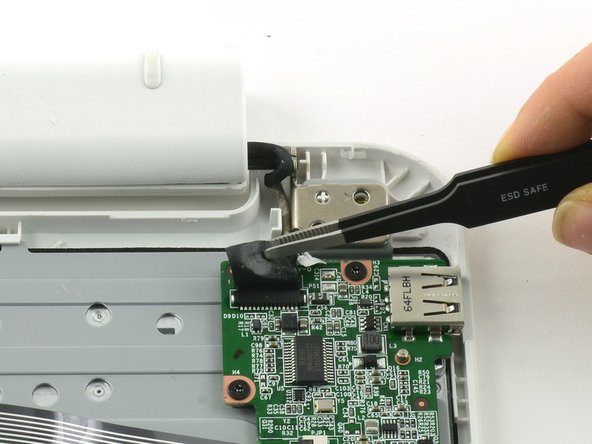
      • Use tweezers to lift the fabric cover and hinge connector away from the daughterboard.

      • Always use ESD safe tools when working with delicate electrical components.

      Ask FixBot

      Add Comment

    1. One Education Infinity One Touchpad Replacement, Daughterboard: step 5, image 1 of 2 One Education Infinity One Touchpad Replacement, Daughterboard: step 5, image 2 of 2
      • Flip up the black retaining flap on the ZIF connector holding the large grey ribbon cable in place.

      • Pull the ribbon cable straight out of the ZIF connector.

      Ask FixBot

      Add Comment

    2. One Education Infinity One Touchpad Replacement: step 6, image 1 of 2 One Education Infinity One Touchpad Replacement: step 6, image 2 of 2
      Tool used on this step:
      Tweezers
      $4.99
      Buy
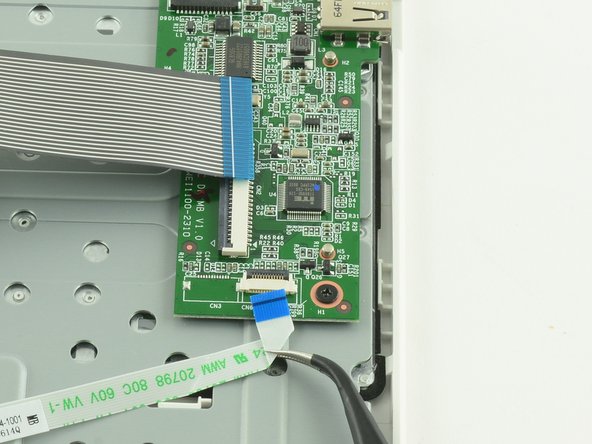
      • Use the flat end of a spudger to flip up the black tab on the smaller ZIF connector.

      • Use tweezers to pull the ribbon cable straight out of the connector.

      Ask FixBot

      Add Comment

    3. One Education Infinity One Touchpad Replacement: step 7, image 1 of 3 One Education Infinity One Touchpad Replacement: step 7, image 2 of 3 One Education Infinity One Touchpad Replacement: step 7, image 3 of 3
      • Use a Phillips #000 screwdriver to unscrew the three 3.4mm screws.

      • Lift the daughterboard away from the device to remove.

      Ask FixBot

      Add Comment

    1. One Education Infinity One Touchpad Replacement, Keyboard Frame Prerequisite: step 8, image 1 of 2 One Education Infinity One Touchpad Replacement, Keyboard Frame Prerequisite: step 8, image 2 of 2
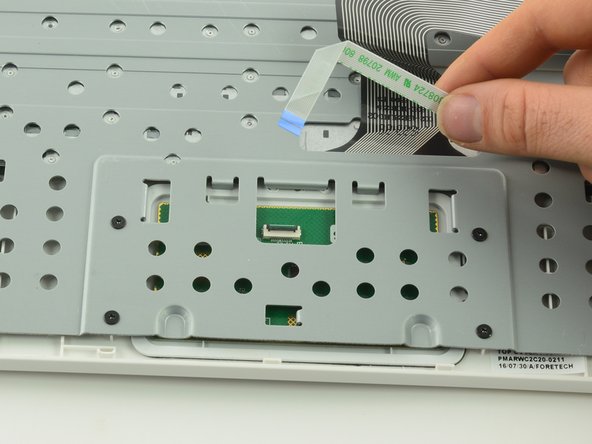
      • Use a spudger to lift up the black retaining flap on the touchpad's ZIF connector.

      • Pull the ribbon cable straight back to remove.

      Ask FixBot

      Add Comment

    2. One Education Infinity One Touchpad Replacement: step 9, image 1 of 1
      • Use a Phillips #00 screwdriver to unscrew the four 6.4mm screws holding the touchpad in place.

      Ask FixBot

      Add Comment

    3. One Education Infinity One Touchpad Replacement: step 10, image 1 of 2 One Education Infinity One Touchpad Replacement: step 10, image 2 of 2
      • Feed the ribbon cable through the hole in the metal frame.

      • Left the metal frame away from the device.

      Ask FixBot

      Add Comment

    1. One Education Infinity One Touchpad Replacement, Touchpad: step 11, image 1 of 2 One Education Infinity One Touchpad Replacement, Touchpad: step 11, image 2 of 2
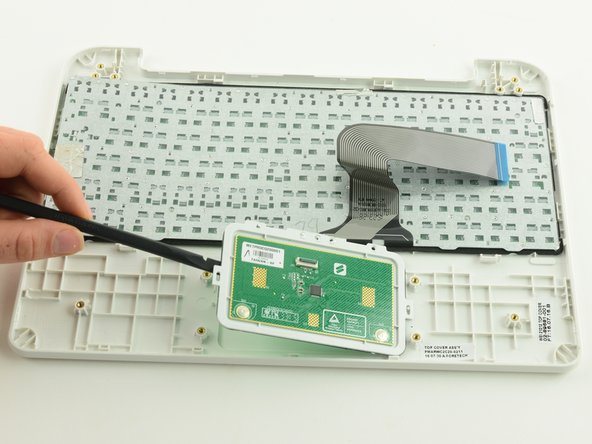
      • Use a spudger to pry the touchpad away from the device.

      Ask FixBot

      Add Comment

Conclusion

To reassemble your device, follow these instructions in reverse order.

Cancel: I did not complete this guide.

Taylor Bratsch

Member since: 09/06/16

6,186 Reputation

14 Guides authored

0 Guide Comments

Add Comment

View Statistics:

Past 24 Hours: 2

Past 7 Days: 18

Past 30 Days: 85

All Time: 635