
Olympus SP-320 Battery Replacement

Brenna McCullough and one other contributor
Last updated on Dec 20, 2016
Views: 1.3K
View statistics:
- Past 24 Hours:
- 2
- Past 7 Days:
- 14
- Past 30 Days:
- 90
- All Time:
- 1,288
Comments: 0
No one has left comments on this guide. Will you be first?
Go to guide commentsCompleted: 0 1
No one has marked this guide "completed." Will you be the first?
1 person has marked this guide "completed." It's you — great job!
Favorites: 0 1
No one has favorited (and subscribed to) this guide. Will you be the first?
1 person has favorited (and subscribed to) this guide — and that's you!
Introduction
Go to step 1 ↓In this guide you will learn how to replace your camera's batteries. Battery replacement is the first solution you should try if your camera turns off suddenly or if no picture is being taken when you press the shutter button.

 Ask FixBot


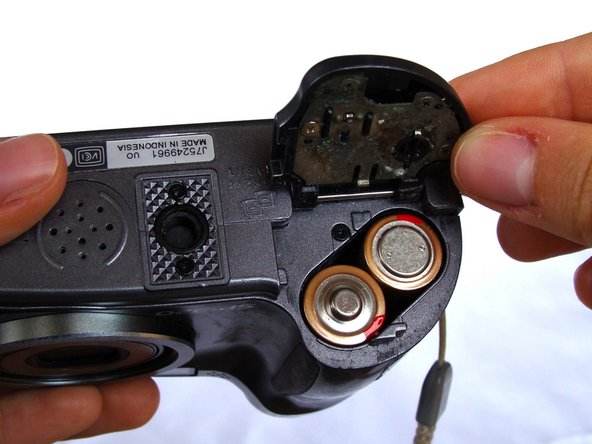

To reassemble your device, follow these instructions in reverse order.

Team

University of North Texas, Team 1-5, Campbell Fall 2016 Member of University of North Texas, Team 1-5, Campbell Fall 2016
UNT-CAMPBELL-F16S1G5
2 Members
36 Guides authored
