
Olympus Pen E-PL7 Battery Replacement

Last updated on Mar 18, 2016
Views: 3.1K
View statistics:
- Past 24 Hours:
- 4
- Past 7 Days:
- 28
- Past 30 Days:
- 136
- All Time:
- 3,123
Comments: 0
No one has left comments on this guide. Will you be first?
Go to guide commentsCompleted: 1 2
1 person has marked this guide "completed." Will you be next?
2 people have marked this guide "completed." Including you — great job!
Favorites: 0 1
No one has favorited (and subscribed to) this guide. Will you be the first?
1 person has favorited (and subscribed to) this guide — and that's you!
Introduction
Go to step 1 ↓Camera not turning on? The battery may need to be recharged or replaced. Use this guide to replace the battery and get back to taking awesome photos!
-
-
-
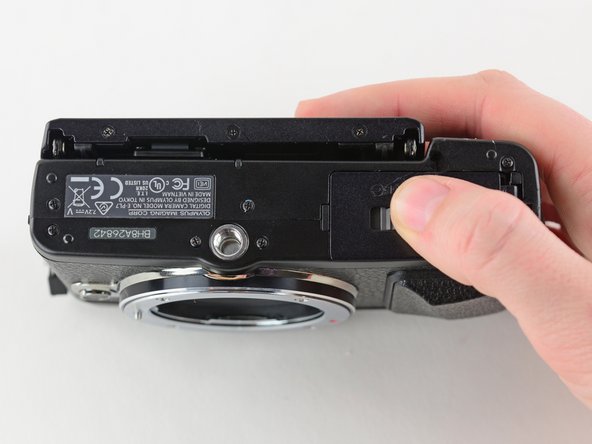
Turn the camera upside down.
-
Push the grey tab to the right to open the battery compartment.
-
Pull out the battery.
 Ask FixBot
-
-
-


To reassemble your device, follow these instructions in reverse order.
Cancel: I did not complete this guide.
One other person completed this guide.

