
Olympus 850SW Battery Replacement

Emma Fincken and 3 other contributors
Last updated on Jun 18, 2015
Views: 1.7K
View statistics:
- Past 24 Hours:
- 2
- Past 7 Days:
- 33
- Past 30 Days:
- 130
- All Time:
- 1,681
Comments: 0
No one has left comments on this guide. Will you be first?
Go to guide commentsCompleted: 1 2
1 person has marked this guide "completed." Will you be next?
2 people have marked this guide "completed." Including you — great job!
Favorites: 0 1
No one has favorited (and subscribed to) this guide. Will you be the first?
1 person has favorited (and subscribed to) this guide — and that's you!
Introduction
Go to step 1 ↓Ensure you have a fully charged battery, and that it is the correct battery if you have purchased a new one. This camera will accept a rechargeable Olympus LI-42B Lithium-Ion battery.
What you need

-
-
-
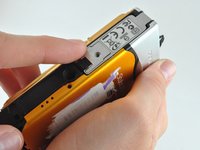
Using a PH00 Phillips Screwdriver, unscrew the one screw located on the latch.
-
-
-
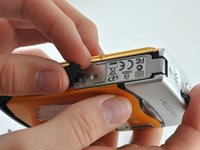
Find the arrows on the compartment, remove the small black plastic piece, and release the latch.
-
-
-
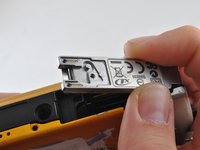
Allow the latch to completely open and insert the battery, with the writing side up.
-
-
-
-
Place the metal cover back over the closed latch, and screw the screw back in.
-

 Ask FixBot




To reassemble your device, follow these instructions in reverse order.
Cancel: I did not complete this guide.
One other person completed this guide.

Team

University of Kentucky Louisville, Team 1-3, Rountree Winter 2015 Member of University of Kentucky Louisville, Team 1-3, Rountree Winter 2015
LOUISVILLE-ROUNTREE-W15S1G3
3 Members
72 Guides authored
