
Nvidia Shield Tablet Battery Replacement

Molly Bauer and 4 other contributors
Last updated on Mar 7, 2024
Views: 58K
View statistics:
- Past 24 Hours:
- 9
- Past 7 Days:
- 34
- Past 30 Days:
- 147
- All Time:
- 58,274
Comments: 35
14 comments on steps, 21 guide comments.
Go to guide commentsCompleted: 30 31
30 people have marked this guide "completed." Will you be next?
31 people have marked this guide "completed." Including you — great job!
Favorites: 10 11
10 people have favorited (and subscribed to) this guide. Will you be next?
11 people have favorited (and subscribed to) this guide — including you!
Featured Student Guide
This guide has been the hard work of our awesome students and is found to be exceptionally cool by the iFixit staff.
Introduction
Go to step 1 ↓The battery of the Nvidia Shield Tablet has been the source of many malfunctioning devices. In fact, the battery has required a recall from Nvidia because of overheating issues. A recall will simply deliver a new tablet to your door; however, if you follow our guide, you can replace your overheated or bad battery right at home.
What you need
Tools
-
-
Spudger4.9
-


-
-
Tool used on this step:Anti-Static Wrist Strap$7.95
-
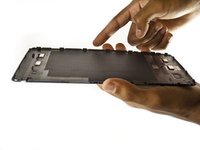
Set the tablet so the buttons, microSD, and stylus port are facing you.
-
Open the microSD slot.
-
Using the flat end of the spudger tool, carefully pry open the case starting from the microSD slot, slowly sliding the spudger along the inside edge of the case.
-
-
-
As you remove your case, be aware of small clips along the edges.
-
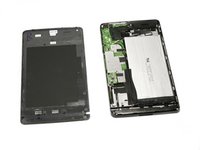
Finally, set the old casing aside.
-
-
-
Tool used on this step:Anti-Static Wrist Strap$7.95
-
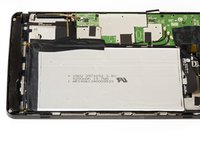
Make sure to rotate your tablet so the large silver battery is closest to you.
-
Using the large plastic opening tool, slowly remove the tape surrounding the battery.
-
-
-
-
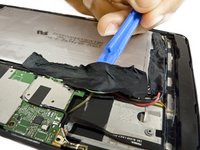
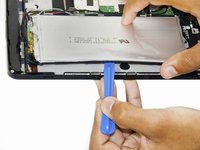
Wedge the large plastic opening tool under the battery.
-
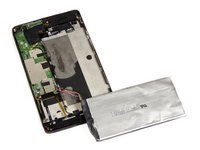
Slowly continue lifting the battery using the plastic opening tool around the perimeter of the battery until the battery is completely separated from the tablet.
-
-
-
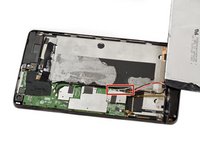
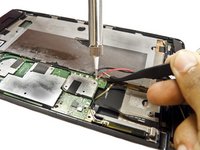
Desolder the four battery wires (red, black, green, and white) from the motherboard.
-
The battery should now come free from the device.
-
-


 Ask FixBot








To reassemble your device, follow these instructions in reverse order.
Cancel: I did not complete this guide.
30 other people completed this guide.

Team

USF Tampa, Team 2-2, Blackwell Fall 2015 Member of USF Tampa, Team 2-2, Blackwell Fall 2015
USFT-BLACKWELL-F15S2G2
3 Members
72 Guides authored
21 Guide Comments
Ok some info for you guys, I already swapped my battery with one from aliexpress.
You don't need to unsolder the loading pcb from the tablet's pcb (black, red, green and white) BECAUSE, you need that very same loading board or otherwise it will only boot up to shutdown immediately.
INSTEAD, remove the black fabric where those wires go into the battery, then unsolder the cell itself from the loading board.
Now check your battery if it came with a loading board, if it came with one, remove that one, you only need the pure cell.
Next step, solder 2 wires where the metal tabs of the battery cell were soldered formerly and connect those 2 wires to the metal tabs of your new cell. (watch out and match the polarity correctly!!!!!)
Before reassembling the tablet, connect your usb charger to the tablet and let it load for 30 sec to one minute.
This resets the IC on the loading board and you can boot up afterwards.
The loading board has a serial number IC onboard, that's why others don't work right out of the box.
Hey thanks so much for this info! I am about to purchase one of these from a friend with the intention to replace the battery. I'd really like to know if following your replacement instructions ends up giving your battery on the nvidia shield the label B01? The Y01 is the subject of the recall which causes so much conflict in these.
Addiontally I've been told that the tablets that were recalled will be force updated to brick to stop any future conflict. Does anyone have any update on this? I'm very much interested in knowing this info before investing in the tablet and the replacement battery. I have the skill, because this is what I do for a living.. but I'm really in need of more info!
Thanks again!
