Free Shipping on Domestic Orders $75+

NuVision Duo 11 Motherboard Replacement

What you need

    1. NuVision Duo 11 Motherboard Replacement, Back Panel: step 1, image 1 of 1
      • Place the flat end of a nylon spudger in the gap between the cover and the rest of the device.

      • Slide the spudger down each side until you hear numerous clicks.

      • Remove the back panel from the tablet.

      Ask FixBot

      Add Comment

    1. NuVision Duo 11 Motherboard Replacement, Battery: step 2, image 1 of 2 NuVision Duo 11 Motherboard Replacement, Battery: step 2, image 2 of 2
      • Carefully remove any pieces of electrical tape that may be adhered to the battery.

      • The tape may be adhered to wires; be sure to pull up the tape slowly.

      Ask FixBot

      Add Comment

    2. NuVision Duo 11 Motherboard Replacement: step 3, image 1 of 1
      Ask FixBot

      Add Comment

    3. NuVision Duo 11 Motherboard Replacement: step 4, image 1 of 1
      • Gently peel the battery from the front case.

      • You will be met with some resistance, so it is critical that you are very careful.

      • DO NOT puncture or bend the battery. It may explode or leak toxic chemicals.

      Ask FixBot

      Add Comment

    1. NuVision Duo 11 Motherboard Replacement, Speakers: step 5, image 1 of 2 NuVision Duo 11 Motherboard Replacement, Speakers: step 5, image 2 of 2
      Ask FixBot

      Add Comment

    2. NuVision Duo 11 Motherboard Replacement: step 6, image 1 of 1
      • Pry the speakers from the casing using a nylon spudger.

      • The speakers may be glued down, so use caution when prying them out.

      Ask FixBot

      Add Comment

    1. NuVision Duo 11 Motherboard Replacement, Motherboard: step 7, image 1 of 2 NuVision Duo 11 Motherboard Replacement, Motherboard: step 7, image 2 of 2
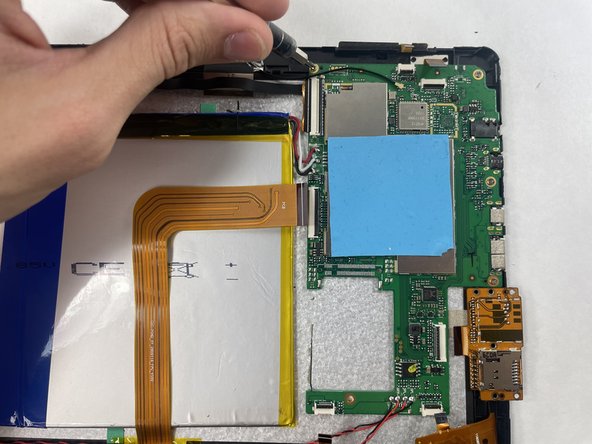
      • Disconnect each ribbon cable from their respective clips on the motherboard.

      Ask FixBot

      Add Comment

    2. NuVision Duo 11 Motherboard Replacement: step 8, image 1 of 1
      • Remove the four 4.8 mm screws from the motherboard using a JIS #000 screwdriver.

      Ask FixBot

      Add Comment

    3. NuVision Duo 11 Motherboard Replacement: step 9, image 1 of 1
      • Remove the motherboard from the tablet.

      Ask FixBot

      Add Comment

Conclusion

To reassemble your device, follow these instructions in reverse order. Take your e-waste to an R2 or e-Stewards certified recycler.

Cancel: I did not complete this guide.

Gavin Amaral

Member since: 03/16/23

377 Reputation

3 Guides authored

Team

0 Guide Comments

Add Comment

View Statistics:

Past 24 Hours: 0

Past 7 Days: 3

Past 30 Days: 18

All Time: 425