
Nostalgia Electrics PCM805 Stand Replacement

Carlton and 3 other contributors
Last updated on Jun 17, 2015
Views: 929
View statistics:
- Past 24 Hours:
- 2
- Past 7 Days:
- 20
- Past 30 Days:
- 93
- All Time:
- 929
Comments: 0
No one has left comments on this guide. Will you be first?
Go to guide commentsCompleted: 0 1
No one has marked this guide "completed." Will you be the first?
1 person has marked this guide "completed." It's you — great job!
Favorites: 0 1
No one has favorited (and subscribed to) this guide. Will you be the first?
1 person has favorited (and subscribed to) this guide — and that's you!
Introduction
Go to step 1 ↓Use this guide to replace the stands on the bottom of the device if they are missing or damaged.
What you need
Parts

-
-
-
First, place the device on its side, making sure the switch is not facing down.
-
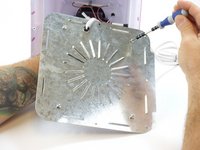
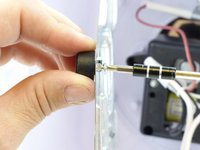
Remove the eight 12mm Phillips #02 screws from the base.
 Ask FixBot
-
-
-


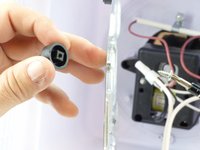
To reassemble your device, follow these instructions in reverse order.

Team

USF Tampa, Team 3-5, Hickman Winter 2015 Member of USF Tampa, Team 3-5, Hickman Winter 2015
USFT-HICKMAN-W15S3G5
5 Members
96 Guides authored
