
Nook Tablet Speaker Assembly Replacement

Josh Fisher and 6 other contributors
Last updated on Jul 31, 2019
Views: 2.6K
View statistics:
- Past 24 Hours:
- 0
- Past 7 Days:
- 2
- Past 30 Days:
- 27
- All Time:
- 2,592
Comments: 2
2 comments on steps.
Completed: 1 2
1 person has marked this guide "completed." Will you be next?
2 people have marked this guide "completed." Including you — great job!
Favorites: 1 2
1 person has favorited (and subscribed to) this guide. Will you be next?
2 people have favorited (and subscribed to) this guide — including you!
Introduction
Go to step 1 ↓If your Nook Tablet speaker assembly component is not working properly or is broken, this guide will take you through the process of taking apart the device down to the motherboard. Then you will replace the speaker assembly with a new speaker assembly to allow for proper functioning again.
What you need
Tools
-
Spudger4.9


-
-
-
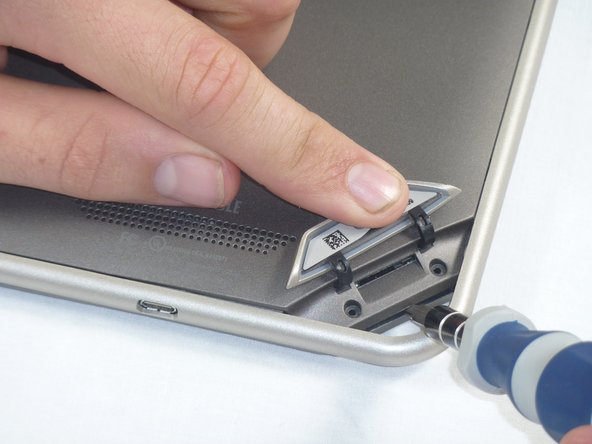
Lift the flap that reads "Nook" to reveal the tape that is underneath. Remove the memory card if one is present.
-
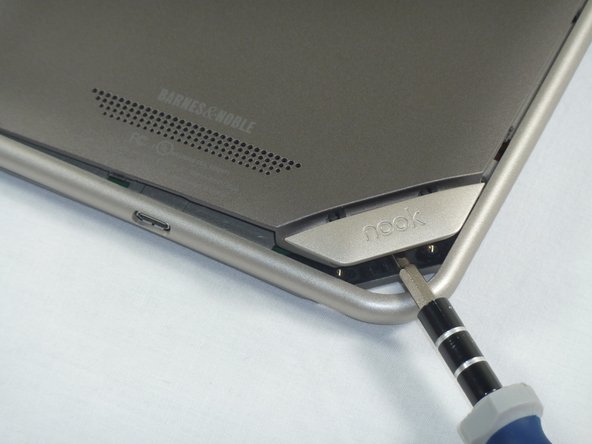
Remove the tape covering the round holes to reveal two T5 Torx screws.
-
Remove the two T5 Torx screws securing the back cover.
-
-
-
Insert the flat end of a spudger between the front panel and the rear assembly.
-
Use a spudger to lift the the back panel from the rest of the Nook.
-
-
-
-
Using the T5 Torx screwdriver, remove the ten T5 screws from around the edges of the silver midframe.
-
-
-
Using a spudger or plastic opening tool, carefully pry the screen bezel away from the silver midframe.
-
-
-
-
-
Lift up the foam pad at the corner of the battery to reveal the battery connector.
-
Use a spudger or plastic opening tool to disconnect the battery cable from the motherboard.
-
-
-
-
-
-
Lift up the foam that covers the power connector and volume connector.
-
Disconnect the power and volume cables from their sockets on the motherboard.
-
-
-
Carefully lift the silver midframe away from the motherboard and display assembly.
-
-
-
-
-
Using your hands pull the square speaker assembly component off the motherboard.
-
-
-
Now place the new speaker assembly component back in the same square location.
-
As Step 12 mentions, make sure to realign the speaker assembly correctly in the square.
-
-

 Ask FixBot





To reassemble your device, follow these instructions in reverse order.
Cancel: I did not complete this guide.
One other person completed this guide.

Team

Cal Poly, Team 1-4, Propen Fall 2012 Member of Cal Poly, Team 1-4, Propen Fall 2012
CPSU-PROPEN-F12S1G4
4 Members
84 Guides authored
