Free Shipping on Domestic Orders $75+

Nook Tablet Midframe Replacement

Views: 906

View statistics:

Past 24 Hours:
2
Past 7 Days:
11
Past 30 Days:
85
All Time:
906
Comments: 2

2 comments on steps.

Completed: 0

No one has marked this guide "completed." Will you be the first?

Favorites: 0

No one has favorited (and subscribed to) this guide. Will you be the first?

Time Required: No estimate
Difficulty: Moderate
Nook Tablet Midframe Replacement

Introduction

Go to step 1 ↓

Use this guide to replace the midframe of your Nook Tablet. This guide is also a prerequisite for accessing or replacing most of the Nook's internal components.

What you need

Tools

  • Spudger
    4.9
  • T5 Torx Screwdriver
    4.9
    1. Nook Tablet Midframe Replacement, Back Cover: step 1, image 1 of 1
      • Flip the Nook over.

      Ask FixBot

      Add Comment

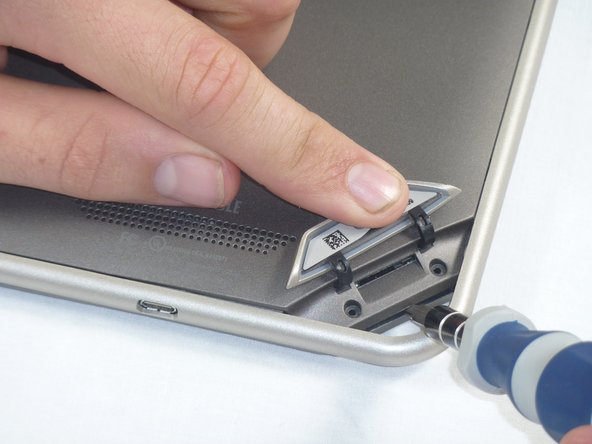
    2. Nook Tablet Midframe Replacement: step 2, image 1 of 2 Nook Tablet Midframe Replacement: step 2, image 2 of 2
      • Lift the flap that reads "Nook" to reveal the tape that is underneath. Remove the memory card if one is present.

      • Remove the tape covering the round holes to reveal two T5 Torx screws.

      • Remove the two T5 Torx screws securing the back cover.

      Ask FixBot

      Add Comment

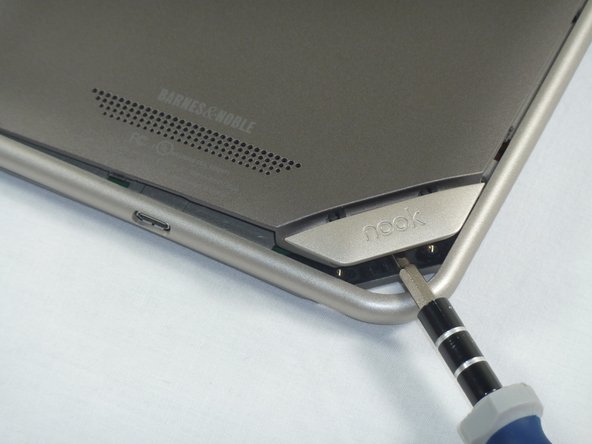
    3. Nook Tablet Midframe Replacement: step 3, image 1 of 2 Nook Tablet Midframe Replacement: step 3, image 2 of 2
      • Insert the flat end of a spudger between the front panel and the rear assembly.

      • Though these photos show a screwdriver, use a spudger or plastic opening tool in order to prevent damage to the device.

      • Use a spudger to lift the the back panel from the rest of the Nook.

      Ask FixBot

      Add Comment

    4. Nook Tablet Midframe Replacement: step 4, image 1 of 2 Nook Tablet Midframe Replacement: step 4, image 2 of 2
      • Slide the spudger around the edges of the Nook to loosen the back panel.

      Ask FixBot

      Add Comment

    5. Nook Tablet Midframe Replacement: step 5, image 1 of 1
      • Pull the back panel off the Nook.

      Ask FixBot

      Add Comment

    1. Nook Tablet Midframe Replacement, Screen Bezel: step 6, image 1 of 2 Nook Tablet Midframe Replacement, Screen Bezel: step 6, image 2 of 2
      • Using the T5 Torx screwdriver, remove the ten T5 screws from around the edges of the silver midframe.

      Ask FixBot

      Add Comment

    2. Nook Tablet Midframe Replacement: step 7, image 1 of 2 Nook Tablet Midframe Replacement: step 7, image 2 of 2
      • Using a spudger or plastic opening tool, carefully pry the screen bezel away from the silver midframe.

      Ask FixBot

      Add Comment

    1. Nook Tablet Midframe Replacement, Disconnect the Battery: step 8, image 1 of 2 Nook Tablet Midframe Replacement, Disconnect the Battery: step 8, image 2 of 2
      • Lift up the foam pad at the corner of the battery to reveal the battery connector.

      • Use a spudger or plastic opening tool to disconnect the battery cable from the motherboard.

      • These photos show a screwdriver, but we recommend using a nonconductive tool like a spudger to prevent a potential short.

      Ask FixBot

      Add Comment

    1. Nook Tablet Midframe Replacement, Midframe: step 9, image 1 of 1
      • Lift up the foam that covers the power connector and volume connector.

      • Disconnect the power and volume cables from their sockets on the motherboard.

      Ask FixBot

      Add Comment

    2. Nook Tablet Midframe Replacement: step 10, image 1 of 2 Nook Tablet Midframe Replacement: step 10, image 2 of 2
      • Carefully lift the silver midframe away from the motherboard and display assembly.

      • Be careful when handling the motherboard, making sure to not dislodge/shift any of its major components.

      Ask FixBot

      Add Comment

Conclusion

To reassemble your device, follow these instructions in reverse order.

Cancel: I did not complete this guide.

Holly Lowe

Member since: 09/26/12

238 Reputation

3 Guides authored

0 Guide Comments

Add Comment

View Statistics:

Past 24 Hours: 2

Past 7 Days: 11

Past 30 Days: 85

All Time: 906