Free Shipping on Domestic Orders $75+

Nokia Lumia 930 Battery Replacement

What you need

  1. Nokia Lumia 930 Battery Replacement, Battery: step 1, image 1 of 1
    • Pull the SIM card holder out of the top of the phone using your fingernail.

    Ask FixBot

    Add Comment

  2. Nokia Lumia 930 Battery Replacement: step 2, image 1 of 2 Nokia Lumia 930 Battery Replacement: step 2, image 2 of 2
    Tool used on this step:
    Tweezers
    $4.99
    Buy
    • Place tweezers or an opening tool in the SIM card slot and push upwards until the back panel pops out.

    Ask FixBot

    Add Comment

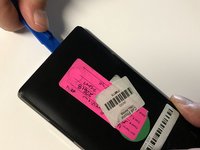
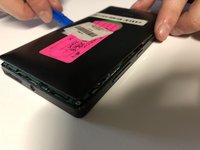
  3. Nokia Lumia 930 Battery Replacement: step 3, image 1 of 2 Nokia Lumia 930 Battery Replacement: step 3, image 2 of 2
    • Wedge a plastic opening tool between the two panels. Slide it along each side of the phone to completely remove the back panel.

    Ask FixBot

    Add Comment

  4. Nokia Lumia 930 Battery Replacement: step 4, image 1 of 1
    • Remove the 4mm Torx #4 screw that's securing the battery connector.

    Ask FixBot

    Add Comment

  5. Nokia Lumia 930 Battery Replacement: step 5, image 1 of 1
    • Use tweezers to remove the battery connector strap.

    Ask FixBot

    Add Comment

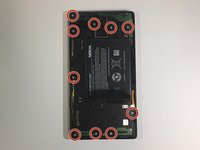
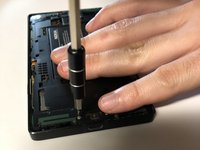
  6. Nokia Lumia 930 Battery Replacement: step 6, image 1 of 2 Nokia Lumia 930 Battery Replacement: step 6, image 2 of 2
    • Remove all ten 4mm Torx #4 screws that secure the battery cover to the frame of the phone.

    Ask FixBot

    Add Comment

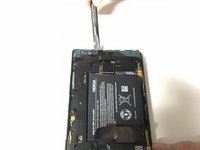
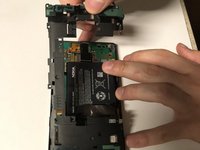
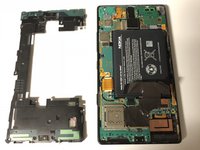
  7. Nokia Lumia 930 Battery Replacement: step 7, image 1 of 3 Nokia Lumia 930 Battery Replacement: step 7, image 2 of 3 Nokia Lumia 930 Battery Replacement: step 7, image 3 of 3
    • Use the flat end of a spudger to pry the battery cover from the phone's frame.

    Ask FixBot

    Add Comment

  8. Nokia Lumia 930 Battery Replacement: step 8, image 1 of 1
    • Pull up on the heat spreader.

    • Be careful not to tear it!

    Ask FixBot

    Add Comment

  9. Nokia Lumia 930 Battery Replacement: step 9, image 1 of 1
    • Use the flat end of the spudger to lift up the battery.

    • The battery is glued in place. Pry up carefully, not to damage it.

    • Two flex cables are directly underneath the battery.

    Ask FixBot

    Add Comment

  10. Nokia Lumia 930 Battery Replacement: step 10, image 1 of 1
    • Remove the battery from the phone.

    Ask FixBot

    Add Comment

Conclusion

To reassemble your device, follow these instructions in reverse order.

Cancel: I did not complete this guide.

3 other people completed this guide.

0 Guide Comments

Add Comment

View Statistics:

Past 24 Hours: 0

Past 7 Days: 9

Past 30 Days: 56

All Time: 6,821