Introduction
Battery draining quickly? It may be time for a new one. Use this guide to help you replace your phone's battery.
What you need
-
-
-
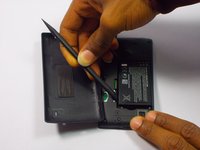
Insert the spudger (non damaging nylon stick tool) into the crevice located between the back cover of the phone and the body of the phone.
 Ask FixBot
-
-
-
-
Lift the spudger gently to separate the back cover of the phone and the body of the phone.
-
-
-
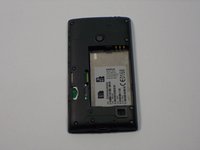
Insert the spudger into the space between the battery and the battery holder, then lift gently to remove the battery.
-
-


To reassemble your device, follow these instructions in reverse order.
Cancel: I did not complete this guide.
3 other people completed this guide.

Team

UMass Dartmouth, Team 1-5, Bhusal Fall 2015 Member of UMass Dartmouth, Team 1-5, Bhusal Fall 2015
UMASSD-BHUSAL-F15S1G5
3 Members
36 Guides authored
2 Guide Comments
First off you don t need any tools to open this device, secondly you may damage the sim board in section 2 of this tutorial.There is a ) at the bottom of thephone to easily remove the battery.Use your fingers to gently push open the cover at the corners of the phone changing battery takes 1 minte.
