What you need
-
-
Press down on the button located at the bottom of the phone, using the center ridge as a guide.
-
Pull the phone apart from the bottom, keeping the button pressed down.
 Ask FixBot
-
-
-
-
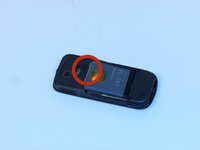
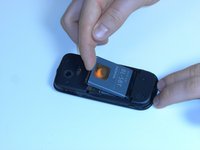
Place a finger or plastic opening tool in the gap between the battery and the phone.
-
Gently lift the battery out.
-
Follow the instructions in reverse order to reassemble the phone.
-


To reassemble your device, follow these instructions in reverse order.
Cancel: I did not complete this guide.
2 other people completed this guide.

Team

James Madison, Team 3-1, Klein Spring 2012 Member of James Madison, Team 3-1, Klein Spring 2012
JMU-KLEIN-S12S3G1
3 Members
14 Guides authored
