Free Shipping on Domestic Orders $75+

Nokia 6590i Vibrator Replacement

What you need

    1. Nokia 6590i Vibrator Replacement, Battery: step 1, image 1 of 2 Nokia 6590i Vibrator Replacement, Battery: step 1, image 2 of 2
      • Press the button on the bottom of the rear cover.

      • Keep the button pressed while pulling the cover downward to remove the back cover.

      • Lift the cover off.

      Ask FixBot

      Add Comment

    2. Nokia 6590i Vibrator Replacement: step 2, image 1 of 1
      • Push the battery down from the top and pull it out.

      Ask FixBot

      Add Comment

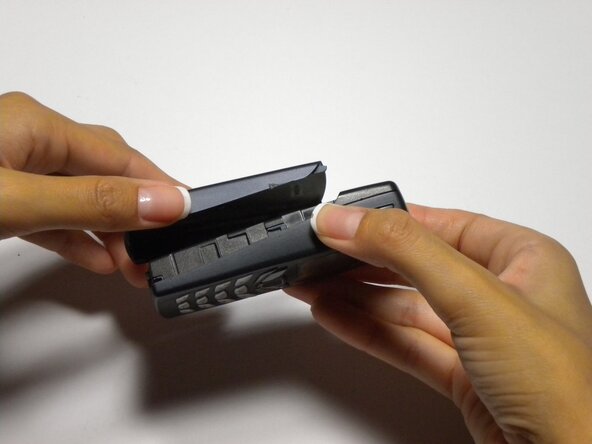
    1. Nokia 6590i Vibrator Replacement, Disassembling Nokia 6590i Keypad, Speaker, and Screen Assembly: step 3, image 1 of 1
      • Grip the front cover from the bottom.

      Ask FixBot

      Add Comment

    2. Nokia 6590i Vibrator Replacement: step 4, image 1 of 1
      • Lift the front cover off.

      Ask FixBot

      Add Comment

    3. Nokia 6590i Vibrator Replacement: step 5, image 1 of 1
      • Remove the six screws using a T6 torx screwdriver.

      Ask FixBot

      Add Comment

    4. Nokia 6590i Vibrator Replacement: step 6, image 1 of 1
      • Insert spudger along edge of assembly and gently lift assembly away from case

      Ask FixBot

      Add Comment

    5. Nokia 6590i Vibrator Replacement: step 7, image 1 of 1
      • Remove assembly from phone

      Ask FixBot

      Add Comment

    1. Nokia 6590i Vibrator Replacement, Logic Board: step 8, image 1 of 1
      • The logic board now sits on top of the phone.

      Ask FixBot

      Add Comment

    2. Nokia 6590i Vibrator Replacement: step 9, image 1 of 1
      • Lift the logic board out of the phone.

      Ask FixBot

      Add Comment

    1. Nokia 6590i Vibrator Replacement, Battery Charger Connector: step 10, image 1 of 1
      • Locate battery charger connector

      Ask FixBot

      Add Comment

    2. Nokia 6590i Vibrator Replacement: step 11, image 1 of 1
      • Grasp top and bottom of battery charger connector on the left side

      Ask FixBot

      Add Comment

    3. Nokia 6590i Vibrator Replacement: step 12, image 1 of 1
      • Lift out the battery charger connector

      Ask FixBot

      Add Comment

    1. Nokia 6590i Vibrator Replacement, Vibrator: step 13, image 1 of 1
      • Grasp vibrator which protrudes from the battery charger connector

      Ask FixBot

      Add Comment

    2. Nokia 6590i Vibrator Replacement: step 14, image 1 of 1
      • Lift the vibrator out of the battery charger connector.

      Ask FixBot

      Add Comment

Conclusion

To reassemble your device, follow these instructions in reverse order.

Cancel: I did not complete this guide.

Colby Leslie

Member since: 10/05/10

13 Reputation

7 Guides authored

Team

Cal Poly, Team 22-3, Maness Fall 2010 Member of Cal Poly, Team 22-3, Maness Fall 2010

CPSU-MANESS-F10S22G3

4 Members

84 Guides authored

0 Guide Comments

Add Comment

View Statistics:

Past 24 Hours: 1

Past 7 Days: 3

Past 30 Days: 12

All Time: 1,399