Introduction
This guide will help locate the motherboard for removal and/or repair.
What you need
-
-
Flip over the phone so that the back is facing up.
-
Pressing your thumb against the back cover, slide the cover off of the phone.
 Ask FixBot
-
-
-
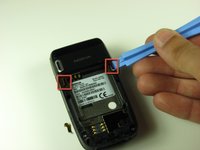
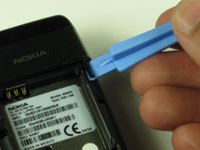
Use the iFixit opening tool to pry out the two tabs at the top corners of the battery compartment.
-
-
-
-
Use a T6 Torx screwdriver to remove the four 7.6 mm screws at the corners of the battery compartment.
-
-
-
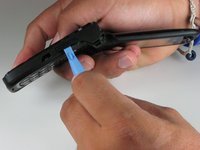
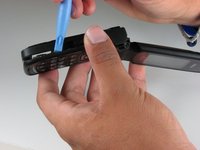
Open the phone and turn it on its side. You will see a seam around the Nokia’s side.
-
Use the iFixit opening tool to run along this seam to pop the clips holding the casing to the frame.
-
-
-
Use your hand to gently pull off the back panel from the bottom half of the phone.
-
-
-
Close the phone and place it on a flat surface.
-
Use the plastic opening tool or your finger to lift up the motherboard from the bottom casing.
-
-
-
Find the underside of the motherboard and locate the ribbon cable that attaches the board to the rest of the phone. Use the plastic opening tool to slowly detach the ribbon cable connector, then pull the motherboard away from the frame.
-






To reassemble your device, follow these instructions in reverse order.
Cancel: I did not complete this guide.
2 other people completed this guide.

Team

Cal Poly, Team 4-46, Amido Fall 2010 Member of Cal Poly, Team 4-46, Amido Fall 2010
CPSU-AMIDO-F10S4G46
4 Members
21 Guides authored
