
Nokia 6085h Keypad Replacement

Andrew and 6 other contributors
Last updated on Apr 29, 2021
Views: 2.8K
View statistics:
- Past 24 Hours:
- 3
- Past 7 Days:
- 17
- Past 30 Days:
- 96
- All Time:
- 2,785
Comments: 0
No one has left comments on this guide. Will you be first?
Go to guide commentsCompleted: 1 2
1 person has marked this guide "completed." Will you be next?
2 people have marked this guide "completed." Including you — great job!
Favorites: 1 2
1 person has favorited (and subscribed to) this guide. Will you be next?
2 people have favorited (and subscribed to) this guide — including you!
Needs Better Images
Better photos will improve this guide. Help out by taking, editing, or uploading new ones!
Inconsistent Images
Updating the images on this guide to be more consistent with the prerequisites would increase its awesomeness.
Better Introduction
Improve this guide by completing or revising its introduction.
Introduction
Go to step 1 ↓This guide give instructions on how to locate the keypad for removal and/or repair.
What you need
Tools


-
-
-
Flip over the phone so that the back is facing up.
-
Pressing your thumb against the back cover, slide the cover off of the phone.
 Ask FixBot
-
-
-
-
-
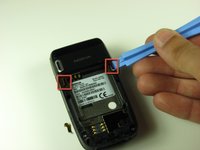
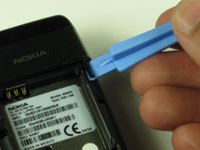
Use the iFixit opening tool to pry out the two tabs at the top corners of the battery compartment.
-
-
-
Use a T6 Torx screwdriver to remove the four 7.6 mm screws at the corners of the battery compartment.
-
-
-
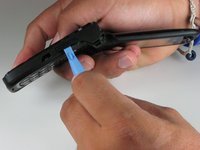
Open the phone and turn it on its side. You will see a seam around the Nokia’s side.
-
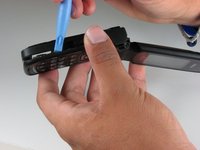
Use the iFixit opening tool to run along this seam to pop the clips holding the casing to the frame.
-
-
-
Use your hand to gently pull off the back panel from the bottom half of the phone.
-
-
-
-
Close the phone and place it on a flat surface.
-
Use the plastic opening tool or your finger to lift up the motherboard from the bottom casing.
-
-
-
Find the underside of the motherboard and locate the ribbon cable that attaches the board to the rest of the phone. Use the plastic opening tool to slowly detach the ribbon cable connector, then pull the motherboard away from the frame.
-
-
-
-
-
Pry the keypad out with the plastic opening tool once the motherboard is moved out of the way.
-
-






To reassemble your device, follow these instructions in reverse order.
Cancel: I did not complete this guide.
One other person completed this guide.

Team

Cal Poly, Team 4-46, Amido Fall 2010 Member of Cal Poly, Team 4-46, Amido Fall 2010
CPSU-AMIDO-F10S4G46
4 Members
84 Guides authored
