
Nokia 6061 Screen Replacement

rosin7 and 12 other contributors
Last updated on Mar 7, 2024
Views: 1.6K
View statistics:
- Past 24 Hours:
- 3
- Past 7 Days:
- 15
- Past 30 Days:
- 92
- All Time:
- 1,612
Comments: 0
No one has left comments on this guide. Will you be first?
Go to guide commentsCompleted: 0 1
No one has marked this guide "completed." Will you be the first?
1 person has marked this guide "completed." It's you — great job!
Favorites: 0 1
No one has favorited (and subscribed to) this guide. Will you be the first?
1 person has favorited (and subscribed to) this guide — and that's you!
Introduction
Go to step 1 ↓Gather tools needed. Have a small tray or container on hand to hold screws and cell phone parts as you disassemble and reassemble the Nokia 6061.
What you need
Tools


-
-
-
Gather the necessary tools:
-
T6 Torx screwdriver
-
Plastic opening tool
-
Small flathead screwdriver
 Ask FixBot
-
-
-
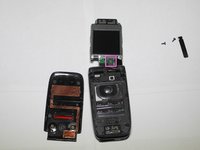
This guide will show you how to replace the LCD—after it's been dropped one too many times.
-
-
Tool used on this step:Flathead 3/32" or 2.5 mm Screwdriver$5.49
-
Using a 2.0 flathead screwdriver, pry open and remove the black, plastic strip (beneath the screen) to reveal the 2 screws holding the screen in place.
-
-
-
Once the screws are removed, flip the phone shut.
-
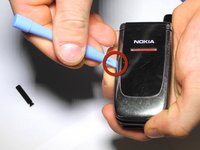
Insert the plastic opening tool at the position indicated and pry along the seam between the front cover and display.
-
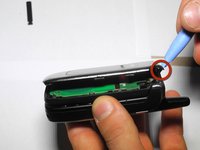
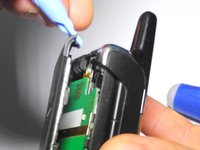
Continue prying along the perimeter of the front cover until it is free from the phone.
-
-
-
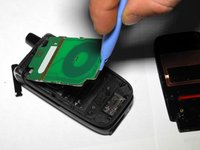
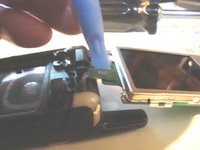
Use a plastic opening tool to pry the LCD circuit board up and out of the phone.
-
-
-
Use a plastic opening tool to gently pry the LCD ribbon cable connector up out its socket on the LCD circuit board.
-
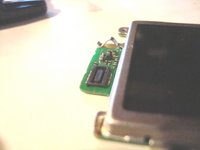
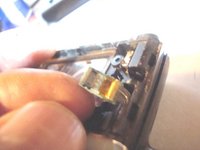
The other two photos show the male and female sides of the small green connector. Make sure they snap together tightly when the new display is attached.
-
-
-
-
To reassemble your phone, reattach the display to the phone by reconnecting the display ribbon cable. Place the screen assembly back into the front case of the phone.
-
-
-
With the cover reattached, flip the phone into the open position and replace the screws removed in step 3. The screw-holes are indicated in the photo.
-
Replace the black, plastic strip by applying pressure until the strip audibly clicks into place.
-
-









Team

Ohio State, Team 1-3, Buehl Spring 2013 Member of Ohio State, Team 1-3, Buehl Spring 2013
OSU-BUEHL-S13S1G3
4 Members
24 Guides authored
