
Nokia 6030 Battery Replacement

Spencer Woodworth and 8 other contributors
Last updated on Oct 13, 2026
Views: 4.3K
View statistics:
- Past 24 Hours:
- 2
- Past 7 Days:
- 11
- Past 30 Days:
- 86
- All Time:
- 4,265
Comments: 0
No one has left comments on this guide. Will you be first?
Go to guide commentsCompleted: 3 4
3 people have marked this guide "completed." Will you be next?
4 people have marked this guide "completed." Including you — great job!
Favorites: 0 1
No one has favorited (and subscribed to) this guide. Will you be the first?
1 person has favorited (and subscribed to) this guide — and that's you!
Better Introduction
Improve this guide by completing or revising its introduction.
Missing Details
Some of this guide's details are missing. Help users by adding tools, difficulty, or time.
Student In Progress
This guide is being worked on by hardworking students.
Introduction
Go to step 1 ↓When a Nokia 6030 experiences power failure due to a dead battery, a quick replacement usually fixes the issue. The battery is fully removable and can be easily replaced by sliding off the phone's back cover.
-
-
-
Press down on the grip on the back of the phone and slide the rear housing down towards the bottom of the phone.
 Ask FixBot
-
-
-
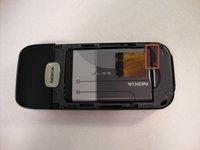
Use your finger to gently pull the bottom of the battery up by using the slip found at the bottom of the phone.
-
Lift out battery and remove.
-
-




To reassemble your device, follow these instructions in reverse order.
Cancel: I did not complete this guide.
3 other people completed this guide.

Team

Cal Poly, Team 23-63, Johann Spring 2010 Member of Cal Poly, Team 23-63, Johann Spring 2010
CPSU-JOHANN-S10S23G63
3 Members
108 Guides authored
