Free Shipping on Domestic Orders $75+

Nokia 6010 screen and speaker replacement

What you need

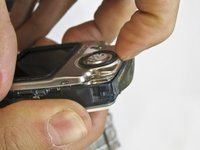
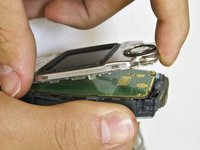
  1. Nokia 6010 screen and speaker replacement, Battery: step 1, image 1 of 3 Nokia 6010 screen and speaker replacement, Battery: step 1, image 2 of 3 Nokia 6010 screen and speaker replacement, Battery: step 1, image 3 of 3
    • Press the small tab on the bottom of the back of the phone.

    • Push the back case upward towards the power button. The back case will then pop off.

    • It requires some force, so be careful.

    Ask FixBot

    Add Comment

  2. Nokia 6010 screen and speaker replacement: step 2, image 1 of 2 Nokia 6010 screen and speaker replacement: step 2, image 2 of 2
    • Lift the battery near the bottom and pry up.

    Ask FixBot

    Add Comment

  3. Nokia 6010 screen and speaker replacement, SIM Card: step 3, image 1 of 1
    • With one hand, press the ridged tab near the visible side of the SIM card.

    • Slide the card out with your other hand.

    Ask FixBot

    Add Comment

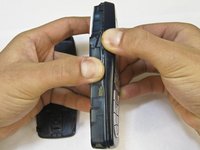
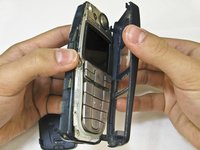
  4. Nokia 6010 screen and speaker replacement, Keypad: step 4, image 1 of 2 Nokia 6010 screen and speaker replacement, Keypad: step 4, image 2 of 2
    • Grip the phone on either the sides, the top, or the bottom.

    • Pull the front case away from the rest of the phone.

    • There are no special tabs to keep it in place so it should wiggle free easily.

    Ask FixBot

    Add Comment

  5. Nokia 6010 screen and speaker replacement: step 5, image 1 of 1
    • Lift the keypad away from the body of the phone.

    • The keypad is the rubber-backed piece with the number keys.

    Ask FixBot

    Add Comment

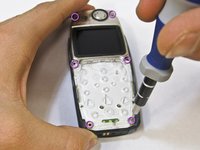
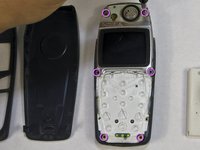
  6. Nokia 6010 screen and speaker replacement, LCD Screen and Speaker: step 6, image 1 of 2 Nokia 6010 screen and speaker replacement, LCD Screen and Speaker: step 6, image 2 of 2
    • Remove the six screws around the front of the phone body with a T6 screwdriver.

    Ask FixBot

    Add Comment

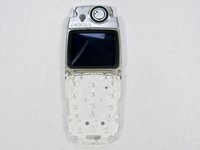
  7. Nokia 6010 screen and speaker replacement: step 7, image 1 of 3 Nokia 6010 screen and speaker replacement: step 7, image 2 of 3 Nokia 6010 screen and speaker replacement: step 7, image 3 of 3
    • Insert your finger underneath the speaker piece and pry away from the phone body.

    • The plastic layer containing the LCD screen and speaker takes some force to remove.

    • There are 4 plastic tabs which keep it in place, but they are hard to press. Be careful and go tab by tab or use a spudger if you are nervous about using too much force.

    • The LCD and the speaker are attached to the same piece and must be replaced together.

    Ask FixBot

    Add Comment

Conclusion

To reassemble your device, follow these instructions in reverse order.

Cancel: I did not complete this guide.

2 other people completed this guide.

Nicholas Hanne

Member since: 01/20/10

129 Reputation

8 Guides authored

Team

Cal Poly, Team 14-45, Regan Winter 2010 Member of Cal Poly, Team 14-45, Regan Winter 2010

CPSU-REGAN-W10S14G45

5 Members

24 Guides authored

1 Guide Comment

Greatly appreciated !!!

Tobi Hunt - Reply Share

Add Comment

View Statistics:

Past 24 Hours: 0

Past 7 Days: 7

Past 30 Days: 43

All Time: 4,731