Free Shipping on Domestic Orders $75+

Nokia 5310b XpressMusic Keypad Replacement

What you need

  1. Nokia 5310b XpressMusic Keypad Replacement, Battery: step 1, image 1 of 1
    • Slide the black battery cover down and off the phone with your thumb to remove it.

    • The battery cover is not shown in this picture

  2. Nokia 5310b XpressMusic Keypad Replacement: step 2, image 1 of 2 Nokia 5310b XpressMusic Keypad Replacement: step 2, image 2 of 2
    • Gently lift the battery with a fingernail to remove it from the back of the phone.

    • Keep the battery removed for the next steps

    • The battery may be replaced or repaired at this step.

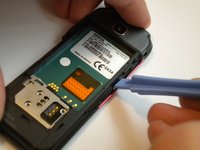
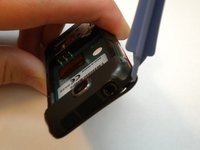
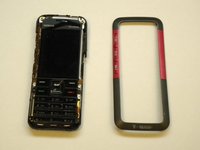
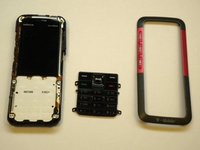
  3. Nokia 5310b XpressMusic Keypad Replacement, Keypad: step 3, image 1 of 3 Nokia 5310b XpressMusic Keypad Replacement, Keypad: step 3, image 2 of 3 Nokia 5310b XpressMusic Keypad Replacement, Keypad: step 3, image 3 of 3
    • On some models, the front case is screwed down from the back. Follow steps 5 and 6 first to remove the camera cover and two T6 screws, BEFORE removing the faceplate.

    • Find a small latch under the music keys and in the middle of each side of the faceplate.

    • Gently lift the edges of the front faceplate off the phone using a spudger.

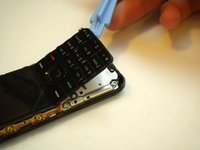
  4. Nokia 5310b XpressMusic Keypad Replacement: step 4, image 1 of 2 Nokia 5310b XpressMusic Keypad Replacement: step 4, image 2 of 2
    • Flip the phone over to the front side.

    • Lift up the keypad from the bottom with either a spudger or your finger.

    • At this time the keypad can be removed and replaced.

Conclusion

To reassemble your device, follow these instructions in reverse order.

5 other people completed this guide.

Max Kirby

Member since: 05/01/11

518 Reputation

4 Guides authored

Team

Cal Poly, Team 15-14, Regan Spring 2011 Member of Cal Poly, Team 15-14, Regan Spring 2011

CPSU-REGAN-S11S15G14

3 Members

8 Guides authored

0 Guide Comments

Add Comment

View Statistics:

Past 24 Hours: 1

Past 7 Days: 8

Past 30 Days: 36

All Time: 6,334