Introduction
If your Nokia 225 4G (2020) no longer holds a charge, shuts off unexpectedly, or fails to power on, replacing the battery may resolve the issue. The battery is a removable component located under the back cover, making this a relatively straightforward repair.
Before beginning the repair, make sure the phone is powered off and disconnected from the charger.
If you are troubleshooting a battery that drains quickly or does not hold a charge, refer to the Nokia 225 4G 2020 Battery Drains Quickly troubleshooting page for possible causes and solutions.
Caution: If the battery appears swollen, puffy, or emits a strange odor, it may be damaged. Swollen batteries should be handled with extreme care. If you do not have the proper tools or safe disposal method, do not handle or attempt to remove it. Swollen batteries have a higher risk of catching fire or exploding. For more information, refer to this article on what to do with a swollen battery.
What you need
-
-
Insert an iFixit opening pick into the seam along the bottom edge of the phone’s back cover.
-
Slide the pick around the edges of the cover to release the retaining clips.
-
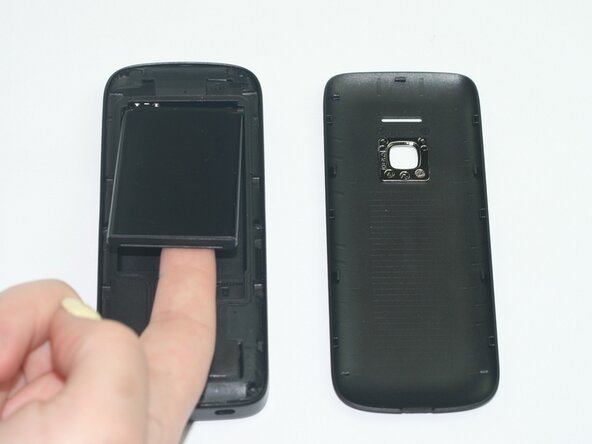
Remove the back casing to expose the battery.
 Ask FixBot
-
-




To reassemble your device, follow these instructions in reverse order. Take your e-waste to an R2 or e-Stewards certified recycler.

Team

Texas Tech, Team 11-3, Weston Spring 2026 Member of Texas Tech, Team 11-3, Weston Spring 2026
TTU-WESTON-S26S11G3
5 Members
10 Guides authored
