
Nokia 2115i battery replacement

Shane and 7 other contributors
Last updated on Nov 22, 2016
Views: 2.1K
View statistics:
- Past 24 Hours:
- 2
- Past 7 Days:
- 19
- Past 30 Days:
- 93
- All Time:
- 2,073
Comments: 0
No one has left comments on this guide. Will you be first?
Go to guide commentsCompleted: 1 2
1 person has marked this guide "completed." Will you be next?
2 people have marked this guide "completed." Including you — great job!
Favorites: 1 2
1 person has favorited (and subscribed to) this guide. Will you be next?
2 people have favorited (and subscribed to) this guide — including you!
Needs Better Images
Better photos will improve this guide. Help out by taking, editing, or uploading new ones!
-
-
-
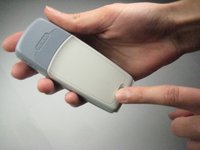
Press down on the small gray button located on the back of the phone.
-
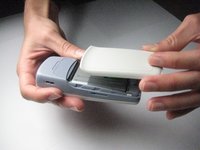
Slide the back plate down and off.
 Ask FixBot
-
-
-
To remove the battery, begin by holding the phone sideways.
-
Then, insert your thumb in the groove below the battery and push the battery up and out.
-
-
-




To reassemble your device, follow these instructions in reverse order.
Cancel: I did not complete this guide.
One other person completed this guide.

Team

Cal Poly, Team 14-38, Forte Fall 2010 Member of Cal Poly, Team 14-38, Forte Fall 2010
CPSU-FORTE-F10S14G38
5 Members
72 Guides authored
