
Nokia 1010 SIM Card Replacement

jnowels1 and 4 other contributors
Last updated on Jun 24, 2015
Views: 9.5K
View statistics:
- Past 24 Hours:
- 8
- Past 7 Days:
- 31
- Past 30 Days:
- 172
- All Time:
- 9,524
Comments: 4
1 comment on steps, 3 guide comments.
Go to guide commentsCompleted: 10 11
10 people have marked this guide "completed." Will you be next?
11 people have marked this guide "completed." Including you — great job!
Favorites: 3 4
3 people have favorited (and subscribed to) this guide. Will you be next?
4 people have favorited (and subscribed to) this guide — including you!
Introduction
Go to step 1 ↓If you are looking to add more memory to your Nokia 1010 this guide will show you how to access your SIM Card slot to add a SIM Card. This guide can also help you to find out where your SIM Card slot is if you want to take the SIM card out to transport your data on your SIM card somewhere else.
What you need
Tools

-
-
-
Using your thumbs, press and slide down the back cover of the Nokia 1010.
 Ask FixBot
-
-
-
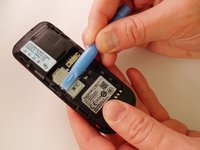
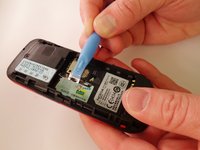
Insert the prying tool in the notch above the battery.
-
Once the prying tool is inserted, lift up the battery.
-
-
-
-
-
-
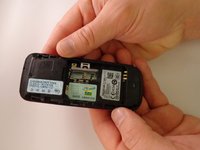
With your finger, remove the SIM card.
-
At this point the SIM card has nothing holding it in and the phone can be turned over allowing the SIM card to fall out.]
-



To reassemble your device, follow these instructions in reverse order.
Cancel: I did not complete this guide.
10 other people completed this guide.

Team

Eastern Washington University, Team 1-1, Plummer Spring 2015 Member of Eastern Washington University, Team 1-1, Plummer Spring 2015
EWU-PLUMMER-S15S1G1
4 Members
72 Guides authored
3 Guide Comments
contact@davidmarsh.org.uk
what is the name or model or size of the SIM card please?
J’ai un problème avec mon téléphone
J’ai un problème avec téléphone
