Free Shipping on Domestic Orders $75+

Nissan Versa Note Media Display System Replacement

What you need

  1. Nissan Versa Note Media Display System Replacement, Media Display System: step 1, image 1 of 1
    • Ensure that the car is turned off.

    Ask FixBot

    Add Comment

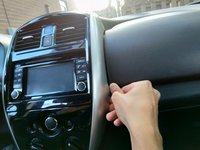
  2. Nissan Versa Note Media Display System Replacement: step 2, image 1 of 1
    • Pull on the switch for indoor/outdoor air to remove it.

    Ask FixBot
    Add Comment

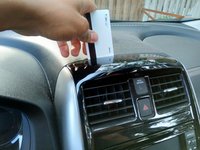
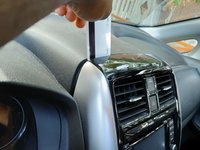
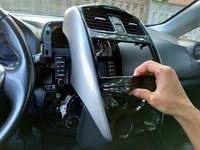
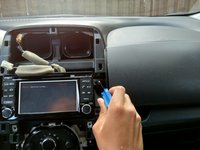
  3. Nissan Versa Note Media Display System Replacement: step 3, image 1 of 2 Nissan Versa Note Media Display System Replacement: step 3, image 2 of 2
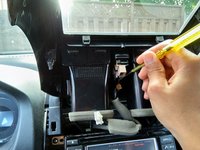
    • Use a spudger (or an old credit card) to gently pry the front panel away from the rest of the dash.

    • After wedging the parts apart you will see a gap.

    Ask FixBot
    Add Comment

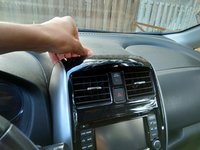
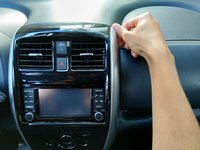
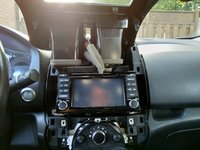
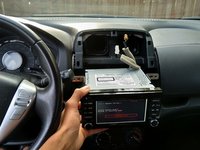
  4. Nissan Versa Note Media Display System Replacement: step 4, image 1 of 3 Nissan Versa Note Media Display System Replacement: step 4, image 2 of 3 Nissan Versa Note Media Display System Replacement: step 4, image 3 of 3
    • Using your fingers, start from the top of the panel and move down on either side to pry the panel open.

    Ask FixBot

    Add Comment

  5. Nissan Versa Note Media Display System Replacement: step 5, image 1 of 2 Nissan Versa Note Media Display System Replacement: step 5, image 2 of 2
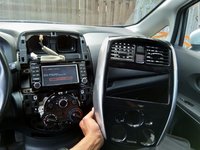
    • Once the panel is free from the dash, flip it over to expose the cables connected to it.

    Ask FixBot

    Add Comment

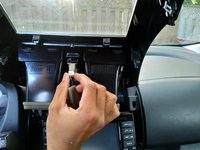
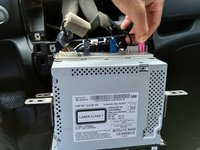
  6. Nissan Versa Note Media Display System Replacement: step 6, image 1 of 3 Nissan Versa Note Media Display System Replacement: step 6, image 2 of 3 Nissan Versa Note Media Display System Replacement: step 6, image 3 of 3
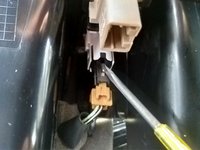
    • Remove the top cable by simply squeezing the end and pulling it out of its socket.

    • Use a spudger to push down on the tab of the bottom cable and remove it.

    Ask FixBot

    Add Comment

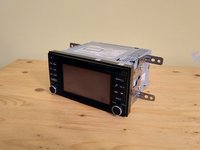
  7. Nissan Versa Note Media Display System Replacement: step 7, image 1 of 3 Nissan Versa Note Media Display System Replacement: step 7, image 2 of 3 Nissan Versa Note Media Display System Replacement: step 7, image 3 of 3
    • The front panel is now completely free from the dash and can be set aside.

    • Using a Phillips #3 screwdriver, remove the two screws on either side of the media system.

    Ask FixBot
    Add Comment

  8. Nissan Versa Note Media Display System Replacement: step 8, image 1 of 2 Nissan Versa Note Media Display System Replacement: step 8, image 2 of 2
    • Carefully pull out the media system and turn it over so that the cables on its rear are visible.

    • Use your hands to pinch the tabs and gently pull out each cable.

    Ask FixBot
    Add Comment

  9. Nissan Versa Note Media Display System Replacement: step 9, image 1 of 3 Nissan Versa Note Media Display System Replacement: step 9, image 2 of 3 Nissan Versa Note Media Display System Replacement: step 9, image 3 of 3
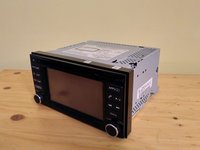
    • Now the media system is completely free from the car.

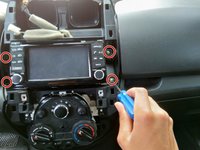
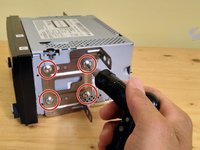
    • Using a T10 Torx screwdriver, unscrew the four screws on either side of the media system.

    Ask FixBot
    Add Comment

Conclusion

To reassemble your device, follow these instructions in reverse order.

Cancel: I did not complete this guide.

3 other people completed this guide.

1 Guide Comment

Muy ilustrativo y de muchá ayuda, gracias

Juanmanuel - Reply Share

Add Comment

View Statistics:

Past 24 Hours: 2

Past 7 Days: 32

Past 30 Days: 152

All Time: 6,365