
Nintendo GameCube Controller Z Button Replacement

Sean Michel and 6 other contributors
Last updated on Jul 24, 2024
Views: 23K
View statistics:
- Past 24 Hours:
- 4
- Past 7 Days:
- 34
- Past 30 Days:
- 163
- All Time:
- 22,842
Comments: 8
2 comments on steps, 6 guide comments.
Go to guide commentsCompleted: 9 10
9 people have marked this guide "completed." Will you be next?
10 people have marked this guide "completed." Including you — great job!
Favorites: 6 7
6 people have favorited (and subscribed to) this guide. Will you be next?
7 people have favorited (and subscribed to) this guide — including you!
Featured Student Guide
This guide has been the hard work of our awesome students and is found to be exceptionally cool by the iFixit staff.
Introduction
Go to step 1 ↓The Z button is located above the right trigger but functions as a button.
What you need
Tools


-
-
-
Place the controller (buttons down) on a solid surface.
-
Remove the six 9.2mm Tri-wing Y0 screws that hold the back panel in place.
 Ask FixBot
-
-
-
-
-
-
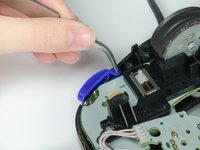
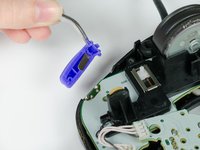
Grab the Z-button by the peg with tweezers and lift it out of the controller.
-
-


To reassemble your device, follow these instructions in reverse order.
Cancel: I did not complete this guide.
9 other people completed this guide.

Team

Cal Poly, Team 19-44, Regan Winter 2013 Member of Cal Poly, Team 19-44, Regan Winter 2013
CPSU-REGAN-W13S19G44
4 Members
108 Guides authored
6 Guide Comments
My z button presses down and makes the click, but it does not actually send any input to the controller. How do you fix this?
So how do you put it back in like the replacement because I have a controller I'm working with a junker my Friend gave me and I'm trying to fix it the z button doesn't work here is a pic
My bad no pic it's a pelican wireless controller
Does that silver bar on the bottom of the Z button supposed to be there? My Z button does not have that, is it important for the button to have that?
