Free Shipping on Domestic Orders $75+

Nintendo Entertainment System cartridge cover replacement

What you need

    1. Nintendo Entertainment System cartridge cover replacement, Removing housing: step 1, image 1 of 2 Nintendo Entertainment System cartridge cover replacement, Removing housing: step 1, image 2 of 2
      • Remove the six 13.50mm PH2 screws from the base plate.

      • The screws are countersunk 40mm into the base plate.

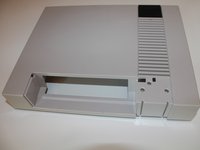
      • Now take off the upper part of the housing.

      Ask FixBot

      Add Comment

    1. Nintendo Entertainment System cartridge cover replacement, Cartridge cover: step 2, image 1 of 3 Nintendo Entertainment System cartridge cover replacement, Cartridge cover: step 2, image 2 of 3 Nintendo Entertainment System cartridge cover replacement, Cartridge cover: step 2, image 3 of 3
      • Take the top housing and turn it over.

      • Remove the four 7,80mm flathead screws.

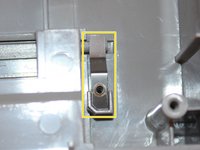
      • Remove both metal clips.

      • If the flap does not stay open properly, you can bend the clips with pliers.

      Ask FixBot

      Add Comment

    2. Nintendo Entertainment System cartridge cover replacement, Cover Flap: step 3, image 1 of 3 Nintendo Entertainment System cartridge cover replacement, Cover Flap: step 3, image 2 of 3 Nintendo Entertainment System cartridge cover replacement, Cover Flap: step 3, image 3 of 3
      • Pull the front black cap off upwards.

      • Now lift the flap out at an angle.

      • The new flap can now be inserted.

      Ask FixBot

      Add Comment

Conclusion

Work the steps in reverse order to reassemble your device.

Cancel: I did not complete this guide.

2 other people completed this guide.

Special thanks to these translators:

de en

100%

These translators are helping us fix the world! Want to contribute?
Start translating ›

TimedIn

Member since: 01/10/20

1,192 Reputation

3 Guides authored

0 Guide Comments

Add Comment

View Statistics:

Past 24 Hours: 7

Past 7 Days: 24

Past 30 Days: 108

All Time: 3,727