Free Shipping on Domestic Orders $75+

Nintendo DS Lite Wi-Fi Board Replacement

What you need

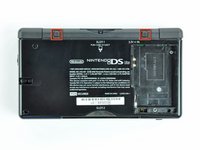
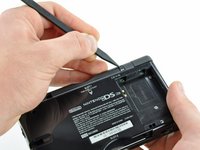
  1. Nintendo DS Lite Wi-Fi Board Replacement, Battery: step 1, image 1 of 2 Nintendo DS Lite Wi-Fi Board Replacement, Battery: step 1, image 2 of 2
    • Unscrew the Phillips screw securing the battery cover to the lower case.

    • The screw remains captive to the battery cover.

    • Pry the battery cover upward with a spudger or fingernail, and lift out of the lower case.

    Ask FixBot

    Add Comment

  2. Nintendo DS Lite Wi-Fi Board Replacement: step 2, image 1 of 1
    • Wedge the edge of a spudger in between the side of the battery and the lower case housing and pry upward to dislodge the battery.

    • Remove the battery from the DS Lite.

    Ask FixBot

    Add Comment

  3. Nintendo DS Lite Wi-Fi Board Replacement, Lower Case: step 3, image 1 of 2 Nintendo DS Lite Wi-Fi Board Replacement, Lower Case: step 3, image 2 of 2
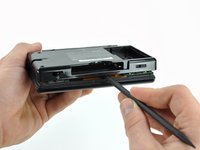
    • Use the tip of a spudger to pry both rubber feet off the DS Lite.

    Ask FixBot

    Add Comment

  4. Nintendo DS Lite Wi-Fi Board Replacement: step 4, image 1 of 1
    • Remove the following screws securing the lower case to the body of the DS Lite:

    • Two 4.3 mm gold Phillips screws

    • One 3.9 mm black Tri-point screw

    • One 3.3 mm silver Phillips screw

    • Three 5.5 mm silver Tri-point screws

    Ask FixBot

    Add Comment

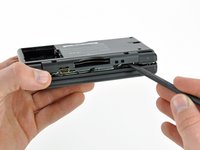
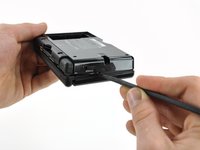
  5. Nintendo DS Lite Wi-Fi Board Replacement: step 5, image 1 of 3 Nintendo DS Lite Wi-Fi Board Replacement: step 5, image 2 of 3 Nintendo DS Lite Wi-Fi Board Replacement: step 5, image 3 of 3
    • Remove the cover from the Game Pak slot before continuing.

    • Insert the edge of a spudger in between the lower and upper case near the top right corner of the DS Lite.

    • Carefully run the spudger along the right edge of the DS Lite, creating an opening in the process.

    • Continue running the spudger along the backside of the DS Lite until the majority of the lower case has been separated from the upper case.

    Ask FixBot

    Add Comment

  6. Nintendo DS Lite Wi-Fi Board Replacement: step 6, image 1 of 1
    • Lift the lower case away from the rest of the DS Lite.

    • Pull carefully. Some units are sealed with adhesive, and pulling too hard can damage the power switch.

    • When re-assembling, make sure that power switch and volume sliders are properly aligned with the switches on the motherboard.

    Ask FixBot

    Add Comment

  7. Nintendo DS Lite Wi-Fi Board Replacement, Trigger Buttons: step 7, image 1 of 2 Nintendo DS Lite Wi-Fi Board Replacement, Trigger Buttons: step 7, image 2 of 2
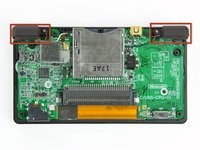
    • Lift both trigger buttons out of the DS Lite.

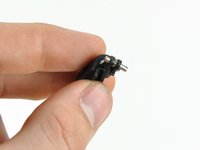
    • The trigger buttons are held in very loosely by small metal pegs and springs. Don't lose track of these pieces.

    • The second picture shows the correct configuration of the trigger assembly for reassembly purposes.

    Ask FixBot

    Add Comment

  8. Nintendo DS Lite Wi-Fi Board Replacement, Wi-Fi Board: step 8, image 1 of 1
    • Use the flat edge of a spudger to pry the Wi-Fi antenna connector straight up from its socket on the Wi-Fi board.

    Ask FixBot

    Add Comment

  9. Nintendo DS Lite Wi-Fi Board Replacement: step 9, image 1 of 1
    • Use the flat edge of a spudger to pry the Wi-Fi board connector straight up from its socket on the motherboard.

    Ask FixBot

    Add Comment

  10. Nintendo DS Lite Wi-Fi Board Replacement: step 10, image 1 of 1
    • Use the flat edge of a spudger to separate the right edge of the Wi-Fi board from the motherboard.

    • The Wi-Fi board is secured to the motherboard with a layer of adhesive.

    • Remove the Wi-Fi board from the DS Lite.

    Ask FixBot

    Add Comment

Conclusion

To reassemble your device, follow these instructions in reverse order.

Cancel: I did not complete this guide.

10 other people completed this guide.

Matthew Newsom

Member since: 01/05/10

42,769 Reputation

67 Guides authored

3 Guide Comments

So I came across a "Prison edition" DSLite out of the Kentucky DOC It I was told that the wifi card was disabled but I take it apart and see that it is still there pluged in and everything you don't happen to know how to turn it back on do you it is a gift for my little brother and would like the WiFi to work.

Vincent - Reply Share

Question anyone knows what the pin layout of the board

Aaron Darren - Reply Share

Merhaba Nintendo Ds lite da wifi kartı bozuldugunda ekran açılmaması normal mi ds lite a güç geliyor ışıklar yanıyor ama ekran gelmiyor

Boş - Reply Share

Add Comment

View Statistics:

Past 24 Hours: 9

Past 7 Days: 67

Past 30 Days: 236

All Time: 21,297