Introduction
This guide will explain how to replace the shoulder buttons on a DS Lite if they are sticking or not working properly.
The tools you’ll need for this task are:
- Spudger or other flat tool
- Screwdrivers
- Phillips
- Tri-wing
What you need
-
-
-
Use a Phillips #00 screwdriver to remove the screw securing the battery cover.
 Ask FixBot
-
-
-
Use a spudger to pry out the battery.
-
Pry off the rubber feet.
-
Remove the seven screws securing the lower case:
-
Three tri-wing screws
-
One Phillips screw
-
Two gold Phillips screws
-
One black tri-wing screw
-
-
-
-
Carefully pry the bottom cover off.
-
Remove the shoulder buttons by pulling out the metal pegs that secure them to DS.
-
-
-
You can now access the micro-button component and replace or repair anything as needed.
-
-


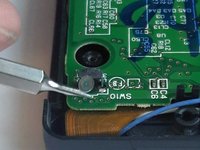
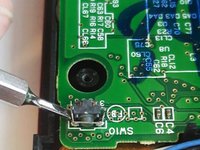
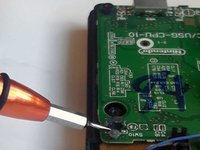
To reassemble your device, follow the steps in reverse order after making your repair.
Cancel: I did not complete this guide.
9 other people completed this guide.

Team

University of Advancing Technology, Team S1-G8, Beam Spring 2019 Member of University of Advancing Technology, Team S1-G8, Beam Spring 2019
UAT-BEAM-S19S1G8
3 Members
12 Guides authored
5 Guide Comments
For anyone dealing with unresponsive shoulder buttons, I highly recommend watching this video guide;
https://www.youtube.com/watch?v=VnWdawXC...
Thanks, this was very helpful. The ifixit guide doesn't include the needed details of how to clean the button contact. This fixed my issue.
