Free Shipping on Domestic Orders $75+

Nintendo 3DS 2015 Lower Case Replacement

What you need

  1. Nintendo 3DS 2015 Lower Case Replacement, Battery: step 1, image 1 of 1
    • Unscrew the two 3mm Phillips #1 head screws along the top edge of the device.

    • The screws on the back panel strip easily. Go slowly and press down firmly.

    • The screws on the back panel are held in by locking washers, so they won't come out of the back panel.

    Ask FixBot

    Add Comment

  2. Nintendo 3DS 2015 Lower Case Replacement: step 2, image 1 of 2 Nintendo 3DS 2015 Lower Case Replacement: step 2, image 2 of 2
    • Pull the top corner tabs of the front face plate outward and towards you.

    • Pull the faceplate up and out of the slots at the bottom of the device.

    • Set aside the back faceplate.

    Ask FixBot

    Add Comment

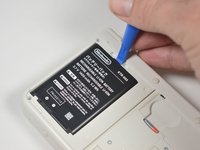
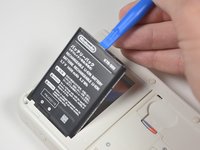
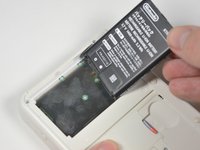
  3. Nintendo 3DS 2015 Lower Case Replacement: step 3, image 1 of 3 Nintendo 3DS 2015 Lower Case Replacement: step 3, image 2 of 3 Nintendo 3DS 2015 Lower Case Replacement: step 3, image 3 of 3
    • Insert a plastic opening tool into the notch at the top of the battery.

    • Pry the battery up with the plastic opening tool.

    Ask FixBot

    Add Comment

  4. Nintendo 3DS 2015 Lower Case Replacement, SD Card Reader: step 4, image 1 of 1
    • Unscrew the three 3mm Y0 screws along the right and bottom of the SD card reader.

    • The bottom of the SD card reader should slightly pop out after removing the screws.

    Ask FixBot

    Add Comment

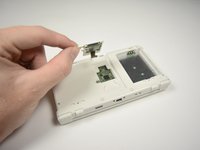
  5. Nintendo 3DS 2015 Lower Case Replacement: step 5, image 1 of 1
    • Pull the SD card reader from the edge with two holes gently to free the tab at the top of the SD card reader.

    • Don't completely pull the SD card out of the device yet. There is a ribbon cable connected under the SD card reader.

    • Reorient the device so that the power jack faces you.

    Ask FixBot

    Add Comment

  6. Nintendo 3DS 2015 Lower Case Replacement: step 6, image 1 of 2 Nintendo 3DS 2015 Lower Case Replacement: step 6, image 2 of 2
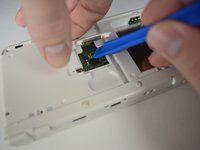
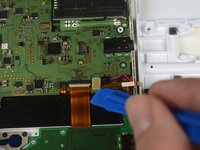
    • Lift the SD card reader gently.

    • Use a plastic opening tool to pry the SD card ribbon cable off the socket on the motherboard.

    • Lift the SD card reader out off of the lower casing.

    Ask FixBot

    Add Comment

  7. Nintendo 3DS 2015 Lower Case Replacement, Lower Case: step 7, image 1 of 3 Nintendo 3DS 2015 Lower Case Replacement, Lower Case: step 7, image 2 of 3 Nintendo 3DS 2015 Lower Case Replacement, Lower Case: step 7, image 3 of 3
    Tool used on this step:
    Tweezers
    $4.99
    Buy
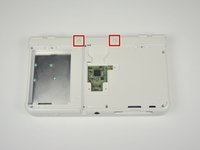
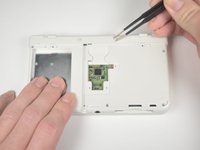
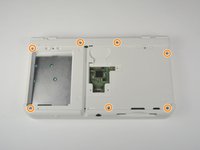
    • Reorient the device so that the game slot now faces you.

    • Remove the two rubber bumpers along the top of the device using tweezers.

    • Unscrew the seven 6mm Phillips #00 screws along the top and bottom of the 3DS.

    Ask FixBot

    Add Comment

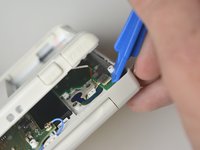
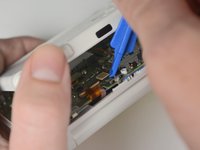
  8. Nintendo 3DS 2015 Lower Case Replacement: step 8, image 1 of 2 Nintendo 3DS 2015 Lower Case Replacement: step 8, image 2 of 2
    • Lift the top edge of the lower case slightly off on the 3DS.

    • Don't pull the lower casing completely off, you may break those connections. There are ribbon cables that must be disconnected first.

    • Pry the ribbon cable socket under the right trigger using a plastic opening tool.

    • Pry the ribbon cable socket under the infrared receiver cover using a plastic opening tool.

    Ask FixBot

    Add Comment

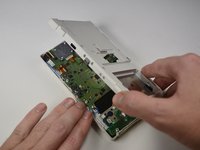
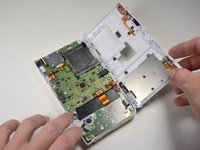
  9. Nintendo 3DS 2015 Lower Case Replacement: step 9, image 1 of 3 Nintendo 3DS 2015 Lower Case Replacement: step 9, image 2 of 3 Nintendo 3DS 2015 Lower Case Replacement: step 9, image 3 of 3
    • Open the device slowly from its top edge. Be careful not to tug the ribbon cable connected near the bottom edge of the device.

    • Pry the last ribbon cable attached to the lower case using a plastic opening tool.

    Ask FixBot

    Add Comment

Conclusion

To reassemble your device, follow these instructions in reverse order.

Cancel: I did not complete this guide.

One other person completed this guide.

Ahmed Gouda

Member since: 10/06/16

299 Reputation

1 Guide authored

Team

Cal Poly, Team 4-6, Livingston Fall 2016 Member of Cal Poly, Team 4-6, Livingston Fall 2016

CPSU-LIVINGSTON-F16S4G6

4 Members

46 Guides authored

0 Guide Comments

Add Comment

View Statistics:

Past 24 Hours: 10

Past 7 Days: 62

Past 30 Days: 188

All Time: 5,872