
Ninja Creami Outer Shell Replacement

Karlee B and 3 other contributors
Last updated on Jul 17, 2026
Views: 1.3K
View statistics:
- Past 24 Hours:
- 2
- Past 7 Days:
- 36
- Past 30 Days:
- 159
- All Time:
- 1,335
Comments: 0
No one has left comments on this guide. Will you be first?
Go to guide commentsCompleted: 0 1
No one has marked this guide "completed." Will you be the first?
1 person has marked this guide "completed." It's you — great job!
Favorites: 0 1
No one has favorited (and subscribed to) this guide. Will you be the first?
1 person has favorited (and subscribed to) this guide — and that's you!
Introduction
Go to step 1 ↓Before replacing the motherboard, daughter board, or internal mechanical parts, you’ll need to carefully open the device to expose its inner components. This guide will walk you through the disassembly process required to reach the internal hardware safely.
Be sure to unplug the device and work on a clean, static-free surface. Handle all parts carefully, especially wiring and small connectors.
What you need
Tools


-
-
-
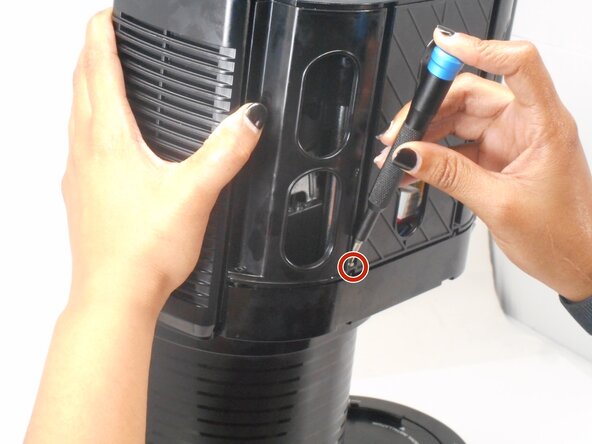
On the NC301 model: on the bottom of each side, remove the two Security T-10 screws that attach the grey cover to the black housing.
-
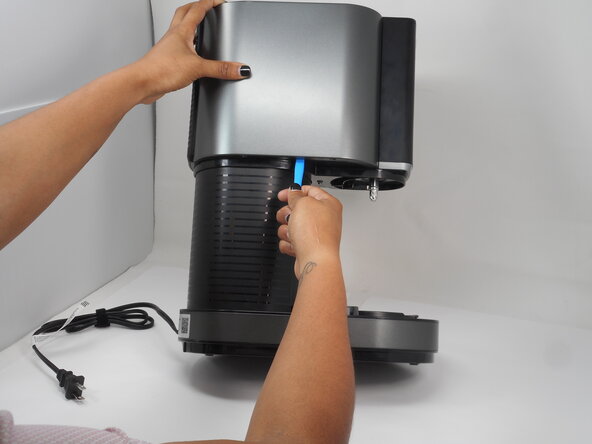
Use an opening tool to gently lift and remove the grey cover from the top of the main piece.
 Ask FixBot
-
-
-
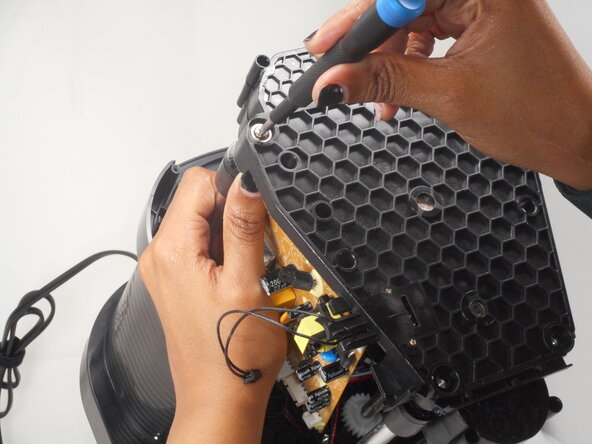
Remove the ten 13.6 mm Phillips screws from the perimeter of the outer cover.
-
On the NC301 model: you also need to remove the two Security T-10 screws below the button panel and near the rotating shaft housing.
-
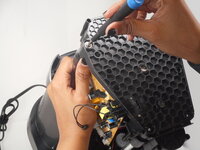
Lift the black plastic cover straight up and off.
-
-
-
-
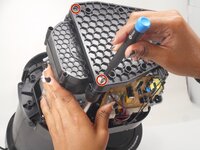
Remove the four 12.2 mm Phillips screws from the black plastic cover.
-
Lift the black plastic cover straight up and off.
-
-





To reassemble your device, follow these instructions in reverse order.

Team

University of Memphis, Team 3-3, Sneed Spring 2025 Member of University of Memphis, Team 3-3, Sneed Spring 2025
UM-SNEED-S25S3G3
4 Members
72 Guides authored
