Free Shipping on Domestic Orders $75+

Nikon D7000 Shutter Assembly Replacement

What you need

  1. Nikon D7000 Shutter Assembly Replacement, Motherboard: step 1, image 1 of 1
    • When loosening the screws, start pressing the screwdriver firmly for the first 1-2 turns (highest torque) until the screw is 'unlocked'. Failing to do so can damage the screw head and make it impossible to disengage that screw.

    • Remove the following 5 screws securing the bottom cover to the camera body:

    • Four 6 mm J000 screws.

    • One 8 mm J000 screw (under lens mount).

    Ask FixBot

    Add Comment

  2. Nikon D7000 Shutter Assembly Replacement: step 2, image 1 of 1
    • Remove three 6 mm J000 screws from under the battery cover.

    Ask FixBot

    Add Comment

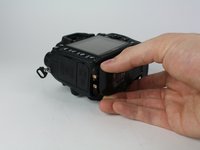
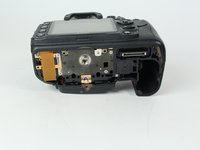
  3. Nikon D7000 Shutter Assembly Replacement: step 3, image 1 of 2 Nikon D7000 Shutter Assembly Replacement: step 3, image 2 of 2
    • Gently pull the bottom cover off of the camera body.

    Ask FixBot

    Add Comment

  4. Nikon D7000 Shutter Assembly Replacement: step 4, image 1 of 1
    • Remove the following screws from the port area:

    • Two 3.5 mm J000 screws.

    • One 6 mm J000 screw (right above ports).

    Ask FixBot

    Add Comment

  5. Nikon D7000 Shutter Assembly Replacement: step 5, image 1 of 1
    Tool used on this step:
    Tweezers
    $4.99
    Buy
    • Peel the rear rubber piece off with tweezers.

    Ask FixBot

    Add Comment

  6. Nikon D7000 Shutter Assembly Replacement: step 6, image 1 of 1
    • Remove one 4.25 mm J000 screw from behind the rear rubber piece.

    Ask FixBot

    Add Comment

  7. Nikon D7000 Shutter Assembly Replacement: step 7, image 1 of 1
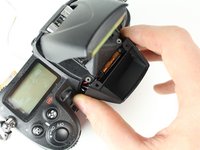
    • Pull the eyepiece cover up to remove it.

    Ask FixBot

    Add Comment

  8. Nikon D7000 Shutter Assembly Replacement: step 8, image 1 of 1
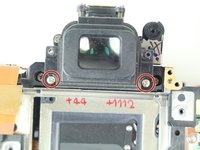
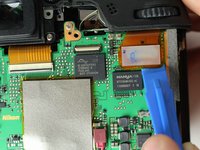
    • Remove two 6 mm J000 screws from behind the eyepiece cover.

    • On D7100 models, there is an additional screw holding the back plate on. This screw is located in the diopter (dial with + - on it). This screw can be accessed by peeling up this sticker on the diopter.
    Ask FixBot

    Add Comment

  9. Nikon D7000 Shutter Assembly Replacement: step 9, image 1 of 1
    • Open the SD card cover by pushing slightly down with your thumb and sliding up.

    Ask FixBot

    Add Comment

  10. Nikon D7000 Shutter Assembly Replacement: step 10, image 1 of 1
    • Remove four 6 mm J000 screws that secure the SD card cover.

    Ask FixBot

    Add Comment

  11. Nikon D7000 Shutter Assembly Replacement: step 11, image 1 of 1
    • Gently pull the SD card cover off.

    Ask FixBot

    Add Comment

  12. Nikon D7000 Shutter Assembly Replacement: step 12, image 1 of 1
    • Remove the following screws that secure the back case:

    • One 6 mm J000 screw.

    • One 3 mm J000 screw.

    Ask FixBot

    Add Comment

  13. Nikon D7000 Shutter Assembly Replacement: step 13, image 1 of 1
    • Carefully lift the back case off.

    Ask FixBot

    Add Comment

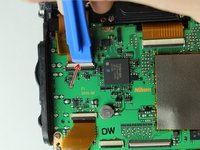
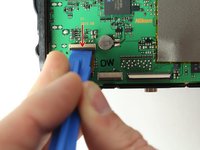
  14. Nikon D7000 Shutter Assembly Replacement: step 14, image 1 of 3 Nikon D7000 Shutter Assembly Replacement: step 14, image 2 of 3 Nikon D7000 Shutter Assembly Replacement: step 14, image 3 of 3
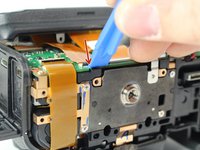
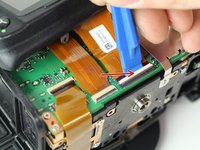
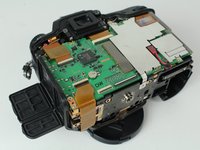
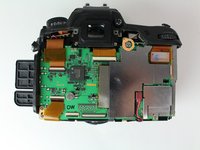
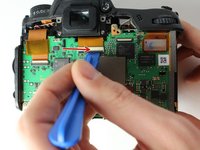
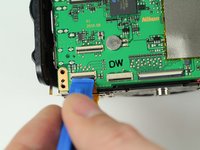
    • Disconnect the following two ribbon cables from the motherboard.

    • See our Cable Connector Guide for help with ribbon cable connectors!

    Ask FixBot

    Add Comment

  15. Nikon D7000 Shutter Assembly Replacement: step 15, image 1 of 2 Nikon D7000 Shutter Assembly Replacement: step 15, image 2 of 2
    • Remove the following screws securing the left motherboard shield:

    • One 2 mm J000 screw (on the bottom).

    • One 3.5 mm J000 screw (on the back).

    • Be careful of the grounding clips on the motherboard.

    Ask FixBot

    Add Comment

  16. Nikon D7000 Shutter Assembly Replacement: step 16, image 1 of 1
    • Gently pry and lift the left motherboard shield off.

    Ask FixBot

    Add Comment

  17. Nikon D7000 Shutter Assembly Replacement: step 17, image 1 of 1
    • Remove one 3.5 mm J000 screw securing the right motherboard shield.

    Ask FixBot

    Add Comment

  18. Nikon D7000 Shutter Assembly Replacement: step 18, image 1 of 1
    • Gently lift the right motherboard shield off with the tip of a spudger.

    Ask FixBot

    Add Comment

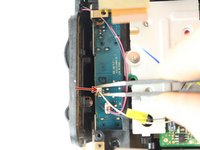
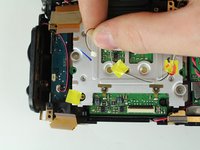
  19. Nikon D7000 Shutter Assembly Replacement: step 19, image 1 of 3 Nikon D7000 Shutter Assembly Replacement: step 19, image 2 of 3 Nikon D7000 Shutter Assembly Replacement: step 19, image 3 of 3
    • Disconnect remaining ribbon cables.

    Ask FixBot

    Add Comment

  20. Nikon D7000 Shutter Assembly Replacement: step 20, image 1 of 2 Nikon D7000 Shutter Assembly Replacement: step 20, image 2 of 2
    • Disconnect remaining ribbon cables.

    Ask FixBot

    Add Comment

  21. Nikon D7000 Shutter Assembly Replacement: step 21, image 1 of 1
    • Carefully disconnect the red connector with tweezers.

    Ask FixBot

    Add Comment

  22. Nikon D7000 Shutter Assembly Replacement: step 22, image 1 of 1
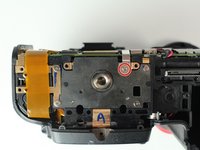
    • Remove four 3.5 mm J000 screws securing the motherboard.

    Ask FixBot

    Add Comment

  23. Nikon D7000 Shutter Assembly Replacement: step 23, image 1 of 1
    • Gently pull the port side cover away from the motherboard.

    Ask FixBot

    Add Comment

  24. Nikon D7000 Shutter Assembly Replacement: step 24, image 1 of 1
    • Lift the motherboard off.

    Ask FixBot

    Add Comment

  25. Nikon D7000 Shutter Assembly Replacement, Tripod Plate: step 25, image 1 of 1
    • Remove four 6 mm J000 screws securing the tripod plate.

    Ask FixBot

    Add Comment

  26. Nikon D7000 Shutter Assembly Replacement: step 26, image 1 of 1
    • Carefully lift the tripod plate from the backside of the camera and slide out the grounding clip from under the lens mount.

    Ask FixBot

    Add Comment

  27. Nikon D7000 Shutter Assembly Replacement, Image Sensor: step 27, image 1 of 2 Nikon D7000 Shutter Assembly Replacement, Image Sensor: step 27, image 2 of 2
    • Disconnect black and white speaker cable.

    Ask FixBot

    Add Comment

  28. Nikon D7000 Shutter Assembly Replacement: step 28, image 1 of 1
    • Remove three 6 mm J000 screws securing the image sensor.

    Ask FixBot

    Add Comment

  29. Nikon D7000 Shutter Assembly Replacement: step 29, image 1 of 1
    • Carefully lift the image sensor plate out of the camera.

    Ask FixBot

    Add Comment

  30. Nikon D7000 Shutter Assembly Replacement, Shutter Assembly: step 30, image 1 of 1
    • Manually pop up flash by inserting a screw driver to the left of the viewfinder and pressing on the metal lever.

    • It won't take much pressure. Press carefully and the flash will pop up when you find the right spot.

    Ask FixBot

    Add Comment

  31. Nikon D7000 Shutter Assembly Replacement: step 31, image 1 of 1
    • Remove two 5 mm J000 screws from under the flash.

    Ask FixBot

    Add Comment

  32. Nikon D7000 Shutter Assembly Replacement: step 32, image 1 of 1
    • Remove two 3 mm J000 screws securing the front cover.

    Ask FixBot

    Add Comment

  33. Nikon D7000 Shutter Assembly Replacement: step 33, image 1 of 2 Nikon D7000 Shutter Assembly Replacement: step 33, image 2 of 2
    • Remove the front cover.

    Ask FixBot

    Add Comment

  34. Nikon D7000 Shutter Assembly Replacement: step 34, image 1 of 1
    • Carefully remove the port cover.

    Ask FixBot

    Add Comment

  35. Nikon D7000 Shutter Assembly Replacement: step 35, image 1 of 1
    • Deroute the microphone cable.

    Ask FixBot

    Add Comment

  36. Nikon D7000 Shutter Assembly Replacement: step 36, image 1 of 1
    • Remove one 4 mm J000 screw from the front.

    Ask FixBot

    Add Comment

  37. Nikon D7000 Shutter Assembly Replacement: step 37, image 1 of 1
    • Remove one 8.5 mm J000 screw from the battery compartment.

    Ask FixBot

    Add Comment

  38. Nikon D7000 Shutter Assembly Replacement: step 38, image 1 of 1
    • Remove the grip carefully.

    Ask FixBot

    Add Comment

  39. Nikon D7000 Shutter Assembly Replacement: step 39, image 1 of 1
    • Remove one 4 mm J000 screw securing the top case (under right strap hook).

    Ask FixBot

    Add Comment

  40. Nikon D7000 Shutter Assembly Replacement: step 40, image 1 of 1
    • Remove one 4 mm J000 screw securing the top case (under left strap hook).

    Ask FixBot

    Add Comment

  41. Nikon D7000 Shutter Assembly Replacement: step 41, image 1 of 1
    • Remove the sticker covering the diopter adjust screw.

    Ask FixBot

    Add Comment

  42. Nikon D7000 Shutter Assembly Replacement: step 42, image 1 of 1
    • Remove one 8.0 mm J000 screw.

    • Remove the Diopeter Adjust.

    Ask FixBot

    Add Comment

  43. Nikon D7000 Shutter Assembly Replacement: step 43, image 1 of 1
    • Remove the top case.

    Ask FixBot

    Add Comment

  44. Nikon D7000 Shutter Assembly Replacement: step 44, image 1 of 1
    • Remove the Black, Yellow, Green cable from the top case board.

    Ask FixBot

    Add Comment

  45. Nikon D7000 Shutter Assembly Replacement: step 45, image 1 of 3 Nikon D7000 Shutter Assembly Replacement: step 45, image 2 of 3 Nikon D7000 Shutter Assembly Replacement: step 45, image 3 of 3
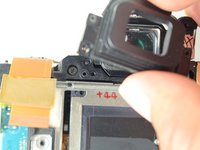
    • Remove two 6.5 mm J000 screws securing the viewfinder.

    • Remove the viewfinder cover.

    Ask FixBot

    Add Comment

  46. Nikon D7000 Shutter Assembly Replacement: step 46, image 1 of 1
    • Remove one 3 mm J000 screw from the bottom left side of the camera.

    Ask FixBot

    Add Comment

  47. Nikon D7000 Shutter Assembly Replacement: step 47, image 1 of 1
    • Remove two 6 mm J000 screws from the left of the shutter.

    Ask FixBot

    Add Comment

  48. Nikon D7000 Shutter Assembly Replacement: step 48, image 1 of 1
    • Remove two 6.5 mm J000 screws from beneath the lens mount.

    Ask FixBot

    Add Comment

  49. Nikon D7000 Shutter Assembly Replacement: step 49, image 1 of 1
    • Remove two screws from just below and to the sides of the viewfinder.

    Ask FixBot

    Add Comment

  50. Nikon D7000 Shutter Assembly Replacement: step 50, image 1 of 1
    • Remove one 5 mm J000 screw from the top right of the camera.

    Ask FixBot

    Add Comment

  51. Nikon D7000 Shutter Assembly Replacement: step 51, image 1 of 1
    • Carefully peel back ribbon cable on the bottom left of camera.

    Ask FixBot

    Add Comment

  52. Nikon D7000 Shutter Assembly Replacement: step 52, image 1 of 2 Nikon D7000 Shutter Assembly Replacement: step 52, image 2 of 2
    • Remove the left front ribbon cable from top right of circuit board.

    Ask FixBot

    Add Comment

  53. Nikon D7000 Shutter Assembly Replacement: step 53, image 1 of 1
    • Remove all three wire connectors.

    Ask FixBot

    Add Comment

  54. Nikon D7000 Shutter Assembly Replacement: step 54, image 1 of 1
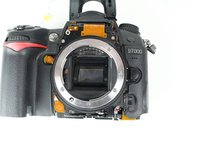
    • Separate the shutter assembly from the camera body.

    Ask FixBot

    Add Comment

Conclusion

To reassemble your device, follow these instructions in reverse order.

Cancel: I did not complete this guide.

36 other people completed this guide.

Steven Castaneda

Member since: 04/02/15

706 Reputation

1 Guide authored

Team

Cal Poly, Team 24-6, Lancaster Spring 2015 Member of Cal Poly, Team 24-6, Lancaster Spring 2015

CPSU-LANCASTER-S15S24G6

3 Members

6 Guides authored

10 Guide Comments

Use a #00 Philips, not a #0, or you'll strip the screws. Also, there are two or three screws connecting the shutter assembly to the camera body, and its contacts are soldered on. So you need a soldering iron for the last step.

Michael Duncan - Reply Share
im gonna be trying this soon , how long did it take and how difficult is it ,,,

Dean Wilkinson - Reply Share

Guide not completed. Last step only shows removal of mirror box. Shutter assembly replacement not

Ziyang - Reply Share

Regardless of possibly a few missing steps, this is a great lesson of how to deal with shutter replacement on my own. Hats off !!

Mateusz Witek - Reply Share

How to reassemble diopter adjustment?

Jerome - Reply Share

Add Comment

View Statistics:

Past 24 Hours: 4

Past 7 Days: 30

Past 30 Days: 109

All Time: 22,926