Free Shipping on Domestic Orders $75+

Nikon D610 Battery Replacement

What you need

    1. Nikon D610 Battery Replacement, Battery: step 1, image 1 of 1
      • First, power off the device.

      Ask FixBot

      Add Comment

    2. Nikon D610 Battery Replacement: step 2, image 1 of 3 Nikon D610 Battery Replacement: step 2, image 2 of 3 Nikon D610 Battery Replacement: step 2, image 3 of 3
      • Set the camera so that it is sitting on its side.

      • Open the battery compartment door by sliding the release button towards the lens.

      • This will cause the door to "pop" open slightly

      Ask FixBot

      Add Comment

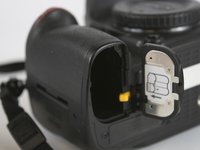
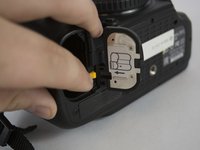
    3. Nikon D610 Battery Replacement: step 3, image 1 of 2 Nikon D610 Battery Replacement: step 3, image 2 of 2
      • Now lift open the battery compartment door.

      • Push the yellow tab lock towards the center to release the battery.

      • This will cause the battery to jump up as there is a spring at the bottom.

      • Pull straight out, slowly on the battery.

      • Make sure you pay attention to which way the battery goes .

      Ask FixBot

      Add Comment

Conclusion

To reassemble your device, follow these instructions in reverse order.

Cancel: I did not complete this guide.

One other person completed this guide.

Daniel Eagan

Member since: 02/10/16

624 Reputation

5 Guides authored

Team

USF Tampa, Team 4-4, Lacy Spring 2016 Member of USF Tampa, Team 4-4, Lacy Spring 2016

USFT-LACY-S16S4G4

3 Members

60 Guides authored

1 Guide Comment

This is my kind of fixing )

Loic - Reply Share

Add Comment

View Statistics:

Past 24 Hours: 1

Past 7 Days: 7

Past 30 Days: 41

All Time: 2,200