Free Shipping on Domestic Orders $75+

Nikon D3100 Motherboard Replacement

Views: 7.1K

View statistics:

Past 24 Hours:
2
Past 7 Days:
34
Past 30 Days:
155
All Time:
7,077
Comments: 2

2 comments on steps.

Completed: 6

6 people have marked this guide "completed." Will you be next?

Favorites: 0

No one has favorited (and subscribed to) this guide. Will you be the first?

Time Required: 10 - 25 minutes
Difficulty: Moderate
Nikon D3100 Motherboard Replacement

Introduction

Go to step 1 ↓

If your camera is malfunctioning or the external connection (micro USB and HDMI) ports are not working, then the camera's motherboard might be faulty and needs to be replaced. Before starting with this guide, refer to this troubleshooting page to check if there are any other possible causes.

What you need

Tools

    1. Nikon D3100 Motherboard Replacement, LCD Screen: step 1, image 1 of 1
      • Use a Phillips #00 screwdriver for all of the screws.

      • Remove two of the 4mm screws indicated by the circles on the bottom side of the camera.

      Ask FixBot

      Add Comment

    2. Nikon D3100 Motherboard Replacement: step 2, image 1 of 2 Nikon D3100 Motherboard Replacement: step 2, image 2 of 2
      • Remove four of the 3mm screws around the eye piece located on the top of the back panel, including the screw hidden behind the auto focus label.

      • Remove the 3mm screw behind the rubber grip on the top right of the back panel.

      Ask FixBot

      Add Comment

    3. Nikon D3100 Motherboard Replacement: step 3, image 1 of 1
      • Peel back the rubber grip on the right side of the camera using a spudger.

      • You may need a heating pad to melt the glue holding the rubber grip to the camera. If using the heating pad, use caution and handle carefully.

      • Remove two of the 5mm screws under the rubber grip.

      Ask FixBot

      Add Comment

    4. Nikon D3100 Motherboard Replacement: step 4, image 1 of 1
      • Remove two of the 4mm screws on the left side of the camera.

      Ask FixBot

      Add Comment

    5. Nikon D3100 Motherboard Replacement: step 5, image 1 of 2 Nikon D3100 Motherboard Replacement: step 5, image 2 of 2
      Tool used on this step:
      Tweezers
      $4.99
      Buy
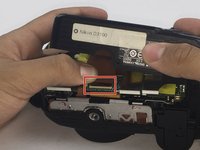
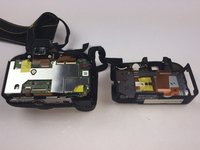
      • Starting from the top, gently lift the back panel of the camera off. Slowly separate the back panel from the main body of the camera.

      • Be careful not to pull the panel out too fast or the ribbon may be damaged.

      • Carefully remove the ribbon using a spudger to lift up the connector and then use tweezers to pull out the ribbon.

      • Separate the back panel from the main body of the camera.

      Ask FixBot

      Add Comment

    6. Nikon D3100 Motherboard Replacement: step 6, image 1 of 1
      • Be careful when separating the metal plate from the back panel because the speaker wire is connected to the metal plate. It can easily be torn if caution is not taken.

      • Remove nine of the 3mm screws connecting the metal plate to the plastic panel.

      Ask FixBot

      Add Comment

    7. Nikon D3100 Motherboard Replacement: step 7, image 1 of 1
      • Remove the tape covering the ribbons. Be careful not to break the tape.

      Ask FixBot

      Add Comment

    8. Nikon D3100 Motherboard Replacement: step 8, image 1 of 1
      • Remove the two ribbons connecting the LCD screen to the metal plate using the same method from Step 5.

      Ask FixBot

      Add Comment

    9. Nikon D3100 Motherboard Replacement: step 9, image 1 of 1
      • Remove the old LCD screen from metal plate.

      Ask FixBot

      Add Comment

    1. Nikon D3100 Motherboard Replacement, Motherboard: step 10, image 1 of 2 Nikon D3100 Motherboard Replacement, Motherboard: step 10, image 2 of 2
      Tool used on this step:
      Tweezers
      $4.99
      Buy
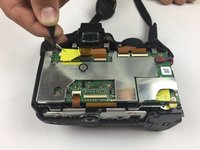
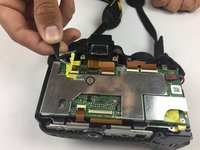
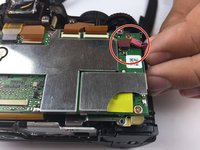
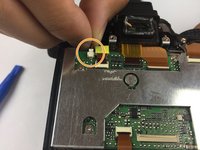
      • Use tweezers to gently lift the yellow tape from the back of the camera.

      Ask FixBot

      Add Comment

    2. Nikon D3100 Motherboard Replacement: step 11, image 1 of 1
      • Use a plastic spudger to remove the 6 ribbons.

      • Be careful not to tear the ribbons.

      Ask FixBot

      Add Comment

    3. Nikon D3100 Motherboard Replacement: step 12, image 1 of 2 Nikon D3100 Motherboard Replacement: step 12, image 2 of 2
      • Remove the plug located on the top-right side of the camera.

      • Remove the plug located on the top-left side of the camera.

      Ask FixBot

      Add Comment

    4. Nikon D3100 Motherboard Replacement: step 13, image 1 of 1
      • Use a Philips #00 Screwdriver to remove the five 3 mm screws marked in the image.

      Ask FixBot

      Add Comment

    5. Nikon D3100 Motherboard Replacement: step 14, image 1 of 2 Nikon D3100 Motherboard Replacement: step 14, image 2 of 2
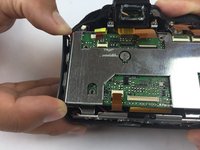
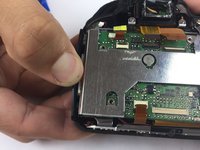
      • Gently pull out the side wall of the camera so that the motherboard comes out easier.

      • Do not pull too hard or you will risk breaking the plastic.

      Ask FixBot

      Add Comment

    6. Nikon D3100 Motherboard Replacement: step 15, image 1 of 1
      • Be careful while lifting the motherboard because there is one more ribbon attached.

      • Gently lift the motherboard to separate it from the back of the camera.

      • Use a plastic spudger to detach the ribbon.

      Ask FixBot

      Add Comment

    7. Nikon D3100 Motherboard Replacement: step 16, image 1 of 1
      • Replace the motherboard.

      Ask FixBot

      Add Comment

Conclusion

To reassemble your device, follow these instructions in reverse order.

Cancel: I did not complete this guide.

6 other people completed this guide.

Jet Mejia

Member since: 09/26/16

686 Reputation

3 Guides authored

Team

USF Tampa, Team 14-1, Eyestone Fall 2016 Member of USF Tampa, Team 14-1, Eyestone Fall 2016

USFT-EYESTONE-F16S14G1

3 Members

36 Guides authored

0 Guide Comments

Add Comment

View Statistics:

Past 24 Hours: 2

Past 7 Days: 34

Past 30 Days: 155

All Time: 7,077