
Nikon D3100 LCD Screen Replacement

Jet Mejia and 9 other contributors
Last updated on Feb 12, 2025
Views: 17K
View statistics:
- Past 24 Hours:
- 11
- Past 7 Days:
- 43
- Past 30 Days:
- 221
- All Time:
- 16,837
Comments: 7
2 comments on steps, 5 guide comments.
Go to guide commentsCompleted: 8 9
8 people have marked this guide "completed." Will you be next?
9 people have marked this guide "completed." Including you — great job!
Favorites: 2 3
2 people have favorited (and subscribed to) this guide. Will you be next?
3 people have favorited (and subscribed to) this guide — including you!
Introduction
Go to step 1 ↓If your Nikon D3100 LCD screen is cracked, chipped, or flickering it may need to be replaced. Follow this guide to replace the LCD screen. But first take a look at this troubleshooting page to check if the problem is truly the LCD screen and not a setting issue.
What you need
Tools
-
-
Spudger4.9


-
-
-
Remove two of the 4mm screws indicated by the circles on the bottom side of the camera.
 Ask FixBot
-
-
-
Remove four of the 3mm screws around the eye piece located on the top of the back panel, including the screw hidden behind the auto focus label.
-
Remove the 3mm screw behind the rubber grip on the top right of the back panel.
-
-
-
Peel back the rubber grip on the right side of the camera using a spudger.
-
Remove two of the 5mm screws under the rubber grip.
-
-
Tool used on this step:Tweezers$4.99
-
Starting from the top, gently lift the back panel of the camera off. Slowly separate the back panel from the main body of the camera.
-
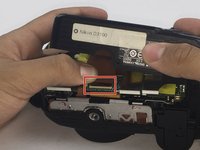
Carefully remove the ribbon using a spudger to lift up the connector and then use tweezers to pull out the ribbon.
-
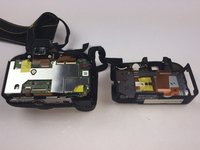
Separate the back panel from the main body of the camera.
-
-
-
Remove nine of the 3mm screws connecting the metal plate to the plastic panel.
-
-
-
-
Remove the two ribbons connecting the LCD screen to the metal plate using the same method from Step 5.
-
-




To reassemble your device, follow these instructions in reverse order.
Cancel: I did not complete this guide.
8 other people completed this guide.

Team

USF Tampa, Team 14-1, Eyestone Fall 2016 Member of USF Tampa, Team 14-1, Eyestone Fall 2016
USFT-EYESTONE-F16S14G1
3 Members
36 Guides authored
5 Guide Comments
Very helpful guide, so happy to have a non-cracked screen again!
now, where can i buy this replacement screen here in the Philippines?
does anyone have the part number for the replacement screen?
Hello, regarde ici ça devrait correspondre:
