Free Shipping on Domestic Orders $75+

Nikon Coolpix S70 Display Screen Replacement

What you need

    1. Nikon Coolpix S70 Display Screen Replacement, Display Screen: step 1, image 1 of 2 Nikon Coolpix S70 Display Screen Replacement, Display Screen: step 1, image 2 of 2
      • Power off the camera before beginning.

      • Remove the battery by sliding the latch located at the bottom of the camera.

      Ask FixBot

      Add Comment

    2. Nikon Coolpix S70 Display Screen Replacement: step 2, image 1 of 2 Nikon Coolpix S70 Display Screen Replacement: step 2, image 2 of 2
      • Using a Phillips head #000 screwdriver, remove the five 0.4mm screws on the bottom of the camera.

      Ask FixBot

      Add Comment

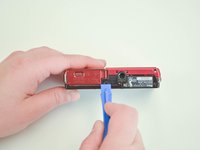
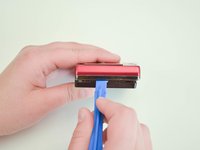
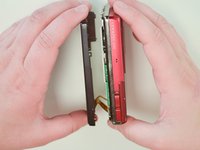
    3. Nikon Coolpix S70 Display Screen Replacement: step 3, image 1 of 3 Nikon Coolpix S70 Display Screen Replacement: step 3, image 2 of 3 Nikon Coolpix S70 Display Screen Replacement: step 3, image 3 of 3
      • Use a plastic opening tool to carefully separate the back panel of the camera.

      • Once loosened, use your fingers to manually separate the two panels.

      Ask FixBot

      Add Comment

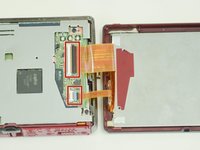
    4. Nikon Coolpix S70 Display Screen Replacement: step 4, image 1 of 3 Nikon Coolpix S70 Display Screen Replacement: step 4, image 2 of 3 Nikon Coolpix S70 Display Screen Replacement: step 4, image 3 of 3
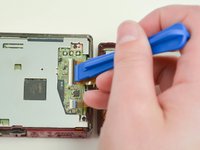
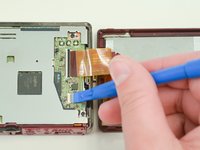
      • Using a plastic opening tool, lift both latches that hold the ribbon cables in place.

      Ask FixBot

      Add Comment

    5. Nikon Coolpix S70 Display Screen Replacement: step 5, image 1 of 1
      • Carefully disconnect the orange flat ribbon cables from the latches.

      Ask FixBot

      Add Comment

    6. Nikon Coolpix S70 Display Screen Replacement: step 6, image 1 of 3 Nikon Coolpix S70 Display Screen Replacement: step 6, image 2 of 3 Nikon Coolpix S70 Display Screen Replacement: step 6, image 3 of 3
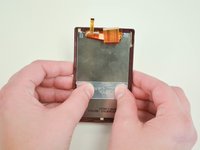
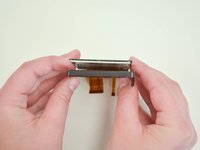
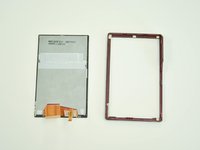
      • Remove the screen from the case of the camera by carefully pushing on the back of the screen.

      • You may need to push with a little force to get the screen to loosen.

      Ask FixBot

      Add Comment

Conclusion

To reassemble your device, follow these instructions in reverse order.

Cancel: I did not complete this guide.

4 other people completed this guide.

Danielle Morris

Member since: 09/24/15

177 Reputation

1 Guide authored

Team

Texas Tech, Team 22-2, Rauch Fall 2015 Member of Texas Tech, Team 22-2, Rauch Fall 2015

TTU-RAUCH-F15S22G2

3 Members

12 Guides authored

1 Guide Comment

my camera's lens show blury photos and when zooming id makes sound

Aliudin Saleh - Reply Share

Add Comment

View Statistics:

Past 24 Hours: 2

Past 7 Days: 10

Past 30 Days: 26

All Time: 1,750