Free Shipping on Domestic Orders $75+

Nikon Coolpix S630 LCD Screen Replacement

What you need

    1. Nikon Coolpix S630 LCD Screen Replacement, Battery Compartment: step 1, image 1 of 1
      • The battery compartment is located on the bottom of the camera.

      • Place your thumb on the battery door.

      • Slide the door away from the camera in the direction the arrow points to.

      Ask FixBot

      Add Comment

    2. Nikon Coolpix S630 LCD Screen Replacement, Battery: step 2, image 1 of 1
      • Slide the yellow tab towards the back of the camera.

      • The battery should pop out.

      • Remove the battery.

      Ask FixBot

      Add Comment

    1. Nikon Coolpix S630 LCD Screen Replacement, Memory Card: step 3, image 1 of 1
      • Press the memory card down into the camera.

      • The memory card should pop out.

      • Remove the memory card.

      Ask FixBot

      Add Comment

    1. Nikon Coolpix S630 LCD Screen Replacement, Back Cover Removal: step 4, image 1 of 3 Nikon Coolpix S630 LCD Screen Replacement, Back Cover Removal: step 4, image 2 of 3 Nikon Coolpix S630 LCD Screen Replacement, Back Cover Removal: step 4, image 3 of 3
      • Unscrew the two 3.5mm Phillips screws from the side with the AV outlet.

      • Unscrew the 3.5mm Phillips screw from the opposite side of the camera.

      • Unscrew the six 3.5mm Phillips screws from the bottom of the camera.

      Ask FixBot

      Add Comment

    2. Nikon Coolpix S630 LCD Screen Replacement: step 5, image 1 of 1
      • Carefully remove the back casing from the camera.

      • Be mindful when removing the back casing as there is a ribbon that still connects the back casing to the motherboard.

      Ask FixBot

      Add Comment

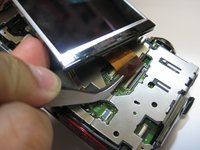
    3. Nikon Coolpix S630 LCD Screen Replacement, Detaching Ribbon: step 6, image 1 of 2 Nikon Coolpix S630 LCD Screen Replacement, Detaching Ribbon: step 6, image 2 of 2
      Tool used on this step:
      Tweezers
      $4.99
      Buy
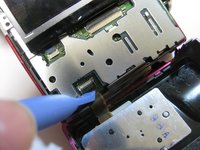
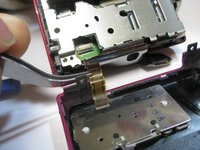
      • Place the plastic opening tool underneath the ribbon tab as shown. Gently lift the tab up.

      • Gently pull the ribbon from the logic board with tweezers.

      • With the ribbon disconnected, the back casing should now be detached from the rest of the camera.

      Ask FixBot

      Add Comment

    1. Nikon Coolpix S630 LCD Screen Replacement, LCD Screen Removal: step 7, image 1 of 3 Nikon Coolpix S630 LCD Screen Replacement, LCD Screen Removal: step 7, image 2 of 3 Nikon Coolpix S630 LCD Screen Replacement, LCD Screen Removal: step 7, image 3 of 3
      Tool used on this step:
      Tweezers
      $4.99
      Buy
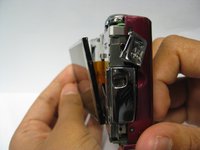
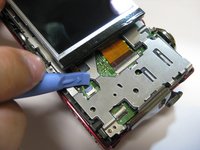
      • Lift LCD screen carefully from the metal casing

      • Be cautious when lifting screen as it is still connected to the logic board by two ribbons

      • Lift the two tabs for both ribbons with a plastic case opener like in the previous step

      • Pull out ribbons gently from the logic board with tweezers to disconnect screen

      Ask FixBot

      Add Comment

    2. Nikon Coolpix S630 LCD Screen Replacement: step 8, image 1 of 1
      • Disconnect the LCD screen from the logic board!

      Ask FixBot

      Add Comment

Conclusion

To reassemble your device, follow these instructions in reverse order.

Cancel: I did not complete this guide.

One other person completed this guide.

Anna Katrina

Member since: 04/18/13

28 Reputation

2 Guides authored

Team

Cal Poly, Team 8-56, Johann Spring 2013 Member of Cal Poly, Team 8-56, Johann Spring 2013

CPSU-JOHANN-S13S8G56

4 Members

27 Guides authored

0 Guide Comments

Add Comment

View Statistics:

Past 24 Hours: 0

Past 7 Days: 10

Past 30 Days: 34

All Time: 1,570