Introduction
Note that the LCD screen display and the glass screen are separate parts.
What you need
-
-
Use your finger to push the latch of the compartment door to the center of the camera body, per image 1.
-
Push the door open, and remove the existing battery with your fingers, per images 2-3.
 Ask FixBot
-
-
-
Remove both 4.5 mm screws holding the bottom into place.
-
Remove both 4.5 mm screws holding the side into place.
-
Remove the 4.5 mm screw underneath the A/V flap.
-
Remove the 4.0 mm screw on the left-side wrist strap loop.
-
-
-
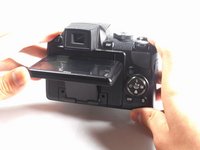
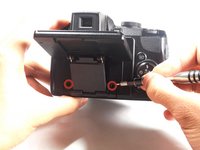
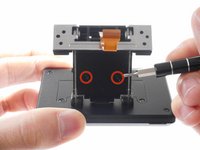
Lift up the LCD screen to reveal the two screws.
-
Using a Phillips #000 Precision Screwdriver, remove the two 3.0 mm screws that hold the arm in place.
-
-
-
-
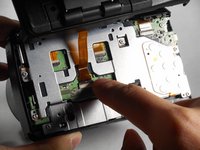
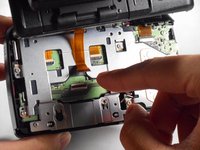
Press your finger on the top of the latch and pull it down and towards you to open the safety latch and free the ribbon.
-
Slide the ribbon out from its socket.
-
-
-
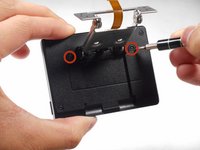
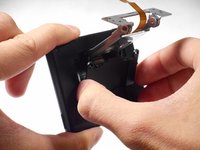
Using a Phillips #000 Precision Screwdriver, remove the two 6.0 mm screws from the inner back panel that hold the LCD screen arm in place.
-
-
-
Using a Phillips #000 Precision Screwdriver, remove the two 3.0 mm screws.
-
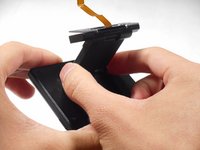
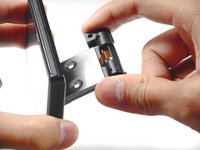
Remove the plastic cover from the LCD screen arm.
-
-
-
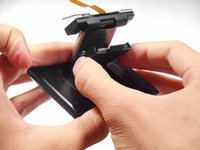
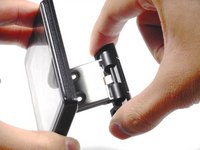
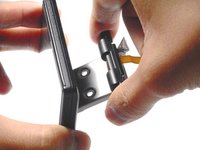
Lift and rotate the plastic connector counter-clockwise, clockwise, then counter-clockwise again.
-
Remove the plastic connector from the LCD screen arm.
-
-
-
Using a Phillips #000 Precision Screwdriver, remove the two 4.0 mm screws.
-
Take off the plastic covering to reveal the inner components of the LCD screen.
-
-
-
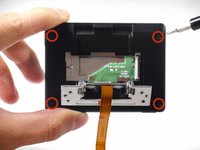
Using a Phillips #000 Precision Screwdriver, remove the four 3.0 mm screws.
-
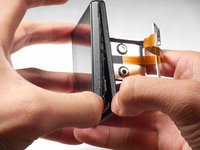
Using your fingers, remove the two plastic borders that case the LCD screen.
-
-
-
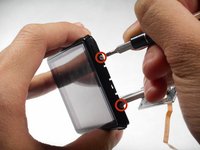
Using a Phillips #000 Precision Screwdriver, remove both 3.5 mm screws from either side of the LCD screen.
-
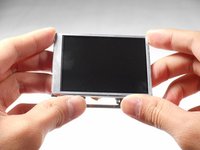
Remove the LCD screen from the screen cover.
-














To reassemble your device, follow these instructions in reverse order.
Cancel: I did not complete this guide.
3 other people completed this guide.

Team

Cal Poly, Team 20-14, Maness Winter 2015 Member of Cal Poly, Team 20-14, Maness Winter 2015
CPSU-MANESS-W15S20G14
4 Members
7 Guides authored
5 Guide Comments
Hello Elizabeth,
I have just followed the video’s for replacing a screen on my Coolpix P90.
The procedure was excellent and for an old Australian (born 1931) I never had a problem.
Just one question, is there a special way for reconnecting the data transfer ribbon.
Just cannot reconnect.
Thank you.
Regards, Noman
QLD Australia.
Help! I must be missing something. I only need to replace the screen and I can’t get the angled screen to lay flat. Because of this I cant access the two screws on the back “extension” piece allowing me to remove the plastic cover on the back of the screen. The camera is a coolpix P90. Any advice?
I also need to know where to buy a new screen.
Everywhere I look on line there are only parts listed for newer models.
Thanks, Allen
I ordered the screen and it got here yesterday. All instructions were followed to the T and I am happy to say that it all worked. Thank you so much for this resource because I surely would not have attempted it without the step by step instructions with pictures.
Again, Thank you.
Jeff S.
2026May25
