This translation was generated by a machine and has not been reviewed by a person yet. Speak this language? Review it.

Nikon Coolpix P7000 Disassembly

Hardy and one other contributor
Last updated on Sep 2, 2026
Views: 5.9K
View statistics:
- Past 24 Hours:
- 2
- Past 7 Days:
- 29
- Past 30 Days:
- 135
- All Time:
- 5,941
Comments: 7
1 comment on steps, 6 guide comments.
Go to guide commentsCompleted: 4 5
4 people have marked this guide "completed." Will you be next?
5 people have marked this guide "completed." Including you — great job!
Favorites: 0 1
No one has favorited (and subscribed to) this guide. Will you be the first?
1 person has favorited (and subscribed to) this guide — and that's you!
Community-Contributed Guide
An awesome member of our community made this guide. It was not created by iFixit staff.
Introduction
Go to step 1 ↓This guide shows how to disassemble a Nikon Coolpix P7000 camera to access its motherboard, lens assembly, and other internal components. Lift the rear cover carefully: two ribbon cables connect it to the motherboard.
-
-
-
Start by removing all the screws visible on the body of the device.
 Ask FixBot
-
-
-
Once all the screws are removed, gently lift the back of the device as it is connected to the motherboard by two ribbon cables.
-
Remove the screws and then, the metal protection plate.
-
Disconnect the ribbon cables from the motherboard by gently lifting the plastic valves.
-
Then, remove the mounting screws from the motherboard. Remove the motherboard but be careful, as it is still connected to the frame with the speaker wires.
-
-
-
-
Now, remove the top cover.
-
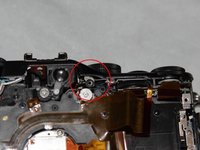
Remove the screw which still maintains the frame. You will find it behind this red circle.
-
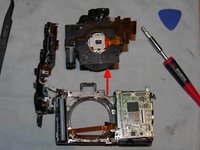
All you have to do now is to remove the optical unit, it comes more easily when pulling it up.
-
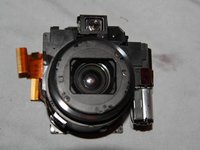
Your device is disassembled with success and you now have access to all its components.
-
-


To reassemble your device, follow these instructions in reverse order.
Cancel: I did not complete this guide.
4 other people completed this guide.
Special thanks to these translators:
100%


These translators are helping us fix the world! Want to contribute?
Start translating ›

6 Guide Comments
Hardy:
Thanks very much for your hard work on this. I have a P7000 whose memory card slot isn’t recognizing cards. I can’t tell for sure, but it looks like the card slot is part of the battery housing. Would you be able to confirm this?
Thanks
Thank you!!! Is there a way to replace the internal battery? Is it present? My p7000 no longer keeps the date/time and settings memory whenever I remove the EN-EL14 battery...
i Have the same issue, Did you fix yours? I think my the issue is related to the Lithium-ion flash capacitor.
But I'm struggling to find that specific part.
хорошая работа - поделиться с людьми информацией. здоровья и удачи мастеру .
