
Nikon Coolpix P530 Battery Replacement

Alan Weihe and 2 other contributors
Last updated on May 10, 2016
Views: 5K
View statistics:
- Past 24 Hours:
- 2
- Past 7 Days:
- 20
- Past 30 Days:
- 103
- All Time:
- 4,956
Comments: 3
3 guide comments.
Go to guide commentsCompleted: 3 4
3 people have marked this guide "completed." Will you be next?
4 people have marked this guide "completed." Including you — great job!
Favorites: 0 1
No one has favorited (and subscribed to) this guide. Will you be the first?
1 person has favorited (and subscribed to) this guide — and that's you!
Introduction
Go to step 1 ↓Continual usage can drain the Nikon Coolpix P530’s battery shortening its lifespan. This guide utilizes a step by step approach on changing the battery in your device. Before following this guide, ensure that the Nikon EN-EL5 rechargeable lithium-ion battery or suitable equivalent is being used during the replacement.
What you need

-
-
-
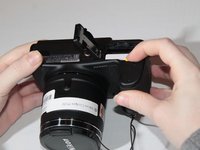
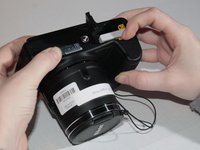
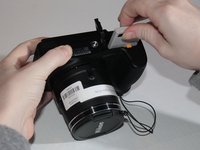
Slide the switch to the left to open the battery chamber using your fingertip or plastic opening tools.
-
The spring loaded battery chamber door will swing open after the switch is moved.
-
-
-
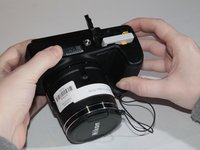
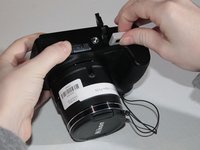
Depress the yellow spring loaded tab holding the battery in place using your fingertip or plastic opening tools.
-
After the yellow tab is depressed, the battery should partially eject from the camera.
-
-

 Ask FixBot




To reassemble your device, follow these instructions in reverse order.
Cancel: I did not complete this guide.
3 other people completed this guide.

Team

University of Kentucky Louisville, Team 1-2, Matravers Spring 2016 Member of University of Kentucky Louisville, Team 1-2, Matravers Spring 2016
LOUISVILLE-MATRAVERS-S16S1G2
3 Members
84 Guides authored
3 Guide Comments
Thanks. Just checking the camera issues.
I can’t get the battery out of my camera. I've had the camera for 5 years with no previous problems. Any suggestions?
top of the battery gets very hot when inserted .Is this normal?
