-
-
-
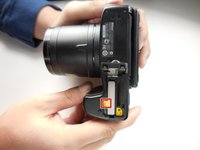
Flip the camera over and push the tab on the battery cover to open the battery compartment.
 Ask FixBot
-
-
-
-
Push the little yellow tab to allow the battery to slide out.
-
With the tab pushed out, pull the battery out.
-
-



To reassemble your device, follow these instructions in reverse order.
Cancel: I did not complete this guide.
One other person completed this guide.

Team

Colorado Springs, Team 2-2, Panko Spring 2015 Member of Colorado Springs, Team 2-2, Panko Spring 2015
UCCS-PANKO-S15S2G2
3 Members
15 Guides authored
3 Guide Comments
Victoria, has had that problem too. In my case the battery was bloated. I had to wiggle it out with a butter knife until I could get a grip on it. I had to replace the battery.
Thank you so much for this information. I used a metal nail file and small pliers. It worked and the battery was swollen
