
Nikon Coolpix L840 Buttons Replacement

Abraham Lozano and 4 other contributors
Last updated on Jun 16, 2016
Views: 3.4K
View statistics:
- Past 24 Hours:
- 3
- Past 7 Days:
- 22
- Past 30 Days:
- 97
- All Time:
- 3,372
Comments: 5
4 comments on steps, 1 guide comment.
Go to guide commentsCompleted: 1 2
1 person has marked this guide "completed." Will you be next?
2 people have marked this guide "completed." Including you — great job!
Favorites: 0 1
No one has favorited (and subscribed to) this guide. Will you be the first?
1 person has favorited (and subscribed to) this guide — and that's you!
Introduction
Go to step 1 ↓This guide details the steps required to replace buttons on the back face of the camera. Please use this guide only when a specific button is not working. When the problem involves other parts of the camera or all of the buttons, you may need to replace a component of the circuit board.
What you need
Tools


-
-
-
Unscrew all eight black, 4mm screws with a Philips 000. (The top-most screw shown in the third image can be accessed by lifting the cover flap off.)
 Ask FixBot
-
-
-
Pry case open with a metal spludger by slipping the spludger between the back and front case of the camera and wiggling the spludger forwards and backwards.
-
-
Tool used on this step:Tweezers$4.99
-
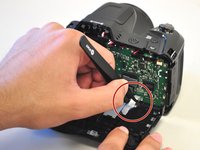
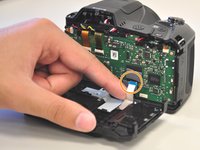
Carefully unhook the silver strip with tweezers. Get a grasp of the sides of the silver strip with the tweezers, and pull upwards and out.
-
The strip may also be identified by its blue tip, which becomes more visible once pulled out.
-
-
-
-
-
Unscrew the two, right-most, 2 mm screws with a Philips 000.
-
Unscrew the left-most, 4 mm screw with a Philips 000.
-
-
-




To reassemble your device, follow these instructions in reverse order.
Cancel: I did not complete this guide.
One other person completed this guide.

Team

Cal Poly, Team 1-11, Maness Spring 2016 Member of Cal Poly, Team 1-11, Maness Spring 2016
CPSU-MANESS-S16S1G11
4 Members
60 Guides authored
